We would like to scheduled a task on Windows Server on all weekdays. At the same time, the task should be disabled on the holidays. Please advise.
Asked
Active
Viewed 2.1k times

4 Answers
3
If this is a Windows Server 2008 - you can try the below from the Task Scheduler -
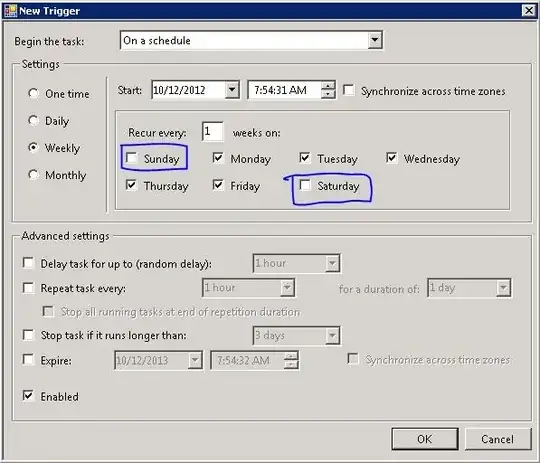
You can then uncheck the days you dont want the task to run as I have highlighted in blue.
I believe this is what you are looking for...

ServerFaulter
- 181
1
Well, One way I see to do this is to the task to end on a holiday, then have a second task starting on the next working day, and ending that task the next holiday. Rinse and repeat per holiday.
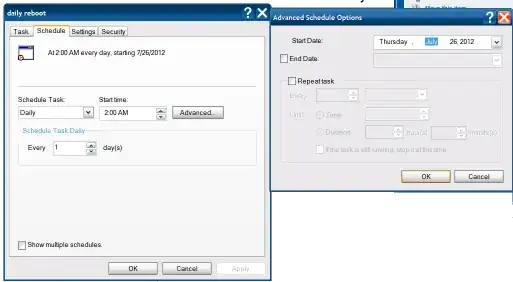
The newer versions of task scheduler does seem to let you string events together, but I don't see any option not to run a task on a specific day.

Journeyman Geek
- 7,036
1
I understand this is a rather old question, but I had the same question. I have an autodialer program that runs via the task scheduler. For obvious reasons I do not want it to run on holidays. My customers would be unhappy if I called them on a holiday.
My solution to the problem is simple. I created another task for the holidays. It runs a powershell script that disables the autodialer task. Once the holiday is over another task is run to re-enable the the task.
The powershell function that I use is Disable-ScheduledTask.
Disable-ScheduledTask -TaskName "AutoDialerStart" Enable-ScheduledTask -TaskName "AutoDialerStart"

Parallogix
- 21
-2
Better answer to what has already been suggested. Set multiple triggers but do it by month so separate trigger for each month and you can choose which days to run. Triggers will be checked sequentially and if they meet the date requirement, that specific trigger will run. Holidays and weekends can be left unselected. At the beginning of each year you would need to reset the days for each trigger you want the task to run but you can call that yearly maintenance. Or hell, set the triggers out for three years or so.. Whatever works for you.

ValMatic
- 1