3

I have a Cisco 2950 switch which has one of its ports connected to an Internet router provided by my ISP; I have no access to the router configuration, but I manage the switch.

If I leave all switch ports with their default setup (auto-negotiation of speed and duplex mode), this link always connects at 100 MBit/s, but in half-duplex mode.

I've tried replacing the cable, and also moving the link to another switch port: the result is always the same. A different device connected to the same port (or to any switch port, really) shows no problem at all.

It could be guessed that someone configured the router to only connect in half-duplex mode... BUT, here's the catch: if I manually force the switch port to full-duplex mode (duplex full in the interface configuration), the link goes up, stays up and is completely stable.

So:

  • The connection is not forced to half-duplex mode by the router, otherwise it would not connect at all if I force the switch end to full-duplex.
  • There is no actual link problem, otherwise the full-duplex connection would not go up or would at least show some errors.
  • But if I leave the port free to auto-negotiate, it always connects in half-duplex mode.

Why?

Massimo
  • 72,827

3 Answers3

7

The router is probably set to either full or half duplex. When one device (your router) is forced to full or half, it completely stops trying to negotiate duplex. It won't even tell the other side what it is set to.

When the other device (your switch) doesn't get a response to its negotiation attempts, it takes the default safest choice, which is half duplex.

Gigabit Ethernet solves this problem by not allowing for anything other than full duplex.

longneck
  • 23,272
4

In addition to the answer longneck provided I'd like to add this blurb from a Dell document on auto-negotiation:

Communication between a non-auto-negotiation 100BaseT device and an auto-negotiation device follows these steps:

  1. The DTE powers up in link fail mode and transmits FLPs.
  2. The 100BaseTX link partner powers up and sends idle symbols.
  3. The DTE parallel detection function detects the idle symbol,bypasses the auto-negotiation function, passes control to the 100BaseTX PMA, and transmits idle.
  4. A link is established at 100 Mbps half duplex.

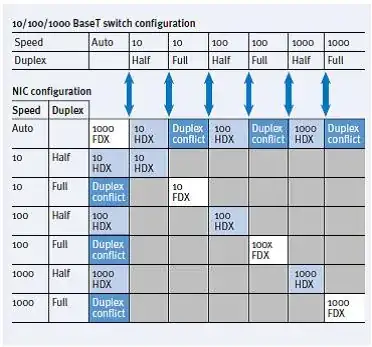
This image shows the possible link states:

enter image description here

joeqwerty
  • 111,849
0

The ISP router is probably not using the same auto-negotiation algorithm that your switch. for example, the ISP router could use the IEEE 802.3u Ethernet standard of 1995, in which the implementation of auto-negotiation was optional and part of the specifications open to interpretation; and your switch is probably UpToDate, and complies with the IEEE 802.3 standard of 1999.

A bypass would be to buy a switch from the same manufacturer as this router, and hope to find (in this new switch) the same auto-negotiation algorithm that this ISP router is used.

Machavity
  • 858
  • 10
  • 27