18

Anyone know if a setting exists to allow a non-admin user to shutdown a server?

Obviously I can set the "Allow Server to shutdown without logon" GPO but that is not quite the same thing. I am looking for a way to properly assign the shutdown right to a particular user if possible.

HopelessN00b
  • 54,273
NickC
  • 2,513

2 Answers2

33

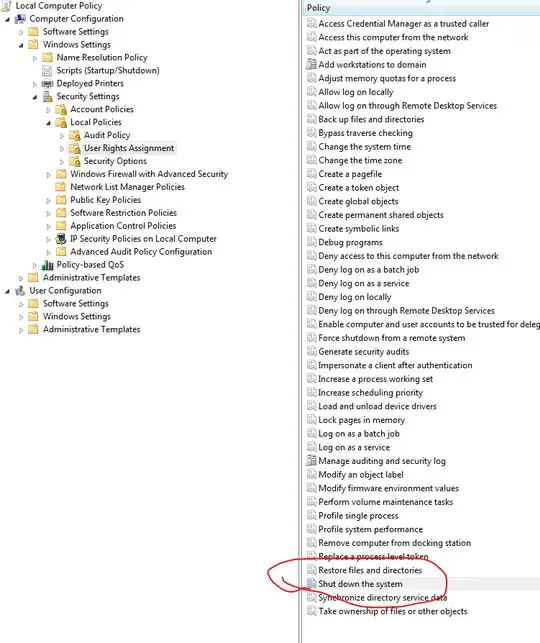
You can assign this in either a GPO or Local Security Policy.

The setting that you're looking for is in Computer Configuration > Windows Settings > Security Settings > Local Policies > User Rights Assignment > Shutdown the system


enter image description here

MDMarra
  • 101,323
0

use "force shutdown from a remote system" then you can build a script like shutdown -r -t 120 -m "hostname" to restart the system remotely.

  • -r = restart
  • -t = time in seconds
  • -m = Target here you have to enter IP or hostname
chicks
  • 3,915
  • 10
  • 29
  • 37
confy
  • 1