57

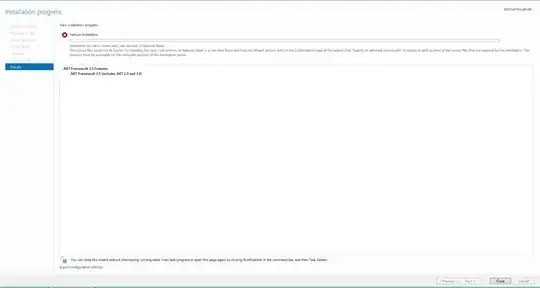
I am trying to install .Net 3.5 on Windows Server 2012 and it constantly keeps failing. I am using "Add or Remove Features" and my Internet is already there. I've read that if alternate source couldn't be found, the installer tries to download online and installs it from there. However, it's not working. This is the screenshot that I keep seeing:

enter image description here

Please suggest what am I missing?

Edit:

I already tried using dism.exe /online /enable-feature /featurename:NetFX3 /Source:D:\sources\sxs /all but I do not have the source disk with me. I want to download it online.

D34DM347
  • 1,471
Tim Tom
  • 681

11 Answers11

67

This behavior can also be caused by a system administrator who configures the computer to use Windows Server Update Services (WSUS) instead of the Microsoft Windows Update server for servicing.

http://support.microsoft.com/kb/2734782

This worked for me. Windows has to download the 3.5 installation files, but the server is configured not to use Windows Update (common for managed servers), but WSUS. The above article describes how to fix this. In a nutshell:

  1. Start the Local Group Policy Editor or Group Policy Management Console (WIN+R and type gpedit.msc).
  2. Expand Computer Configuration, expand Administrative Templates, and then select System.
  3. Open the Specify settings for optional component installation and component repair Group Policy setting, and then select Enabled.
  4. Select the Contact Windows Update directly to download repair content instead of Windows Server Update Services (WSUS) checkbox. options to enable

  5. Make sure Windows Updates Service is set to Manual or Automatic to apply this fix. Our default images are set to disabled, and the issue continued until that seemingly obvious change was made.

Richard
  • 771
10

Step 1: Uninstall any of these updates in: Control Panel -> Uninstall a Program -> View Installed Updates.

  • KB2966826
  • KB2966827
  • KB2966828

Step 2: Then, retry installing the feature using the GUI (Server Manager), command line (dism), or PowerShell (Install-WindowsFeature)


Additional information on enabling features


Method 1: Using GUI - Server Manager

Server Manager -> Add Roles and Features -> Role-based or feature-based installation -> Select Server -> Features -> .NET Framework 3.5 Features

Method 2: Using Command Line - dism

dism : Using local installation media/Windows update/WSUS

dism /online /enable-feature /featurename:NetFx3 /all

DISM: With a local 'Alternate Source'

dism /online /enable-feature /featureName:NetFx3 /all /limitAccess /source:drive_letter:\sources\sxs

Please replace drive_letter with the drive letter of your local drive where the installation files reside

DISM: With a remote 'Alternate Source'

dism /online /enable-feature /featurename:netfx3 /all /LimitAccess /source:\\share_name\sources\sxs

Please replace share_name with the the UNC of the shared location where the installation files reside

Method 3: Using PowerShell

PowerShell: Using local installation media/Windows update/WSUS

Install-WindowsFeature –name NET-Framework-Core

PowerShell: With a local 'Alternate Source'

Install-WindowsFeature –name NET-Framework-Core –source x:\sources\sxs /source:drive_letter:\sources\sxs

Please replace drive_letter with the drive letter of your local drive where the installation files reside

PowerShell: With a remote 'Alternate Source'

Install-WindowsFeature –name NET-Framework-Core –source \\share_name\sources\sxs

Please replace share_name with the the UNC of the shared location where the installation files reside

Helpful Resources:

http://www.askvg.com/fix-0x800f0906-and-0x800f081f-error-messages-while-installing-net-framework-3-5-in-windows-8/

http://blogs.technet.com/b/askcore/archive/2012/05/14/windows-8-and-net-framework-3-5.aspx
slayernoah
  • 1,810
5

After trying to install .net 3.5 on Windows Server 2012 for 3 days, I have finally managed to do it.

The key for me was to check the installed windows updates for KB2966826, KB2966827 and KB2966828. I had KB2966827 installed and after removing it, I could install 3.5 via Server Manager.

See this article http://www.askvg.com/fix-0x800f0906-and-0x800f081f-error-messages-while-installing-net-framework-3-5-in-windows-8/

wainy
  • 151
5

When running netfx3 feature enable, it stopped ad 66.6%.

DISM /Online /Enable-Feature /FeatureName:NetFx3 /All

I verified my proxy settings in Internet Explorer > Connections.

I changed my group policy settings to enable optional components

Computer Configuration > Administrative Templates > System > 

Enable "Specify stettings for optional component installation and co...."
Check the check box "Contact Windows Update..."

After all this, I finally managed to install .NET Framework 3.5 in windows 2012.

Hope it helps!

3

In Internet Explorer, go to:

  • Tools
  • Internet Options
  • Security
  • Internet
  • Custom Level
  • Downloads | File Download = Enable

Run PowerShell as an Administrator Enter this, to download and install .net 3.5:

DISM /Online /Enable-Feature /FeatureName:NetFx3 /All 

Result: PS C:\Users\Administrator> DISM /Online /Enable-Feature /FeatureName:NetFx3 /All

Deployment Image Servicing and Management tool Version: 6.3.9600.17031

Image Version: 6.3.9600.17031

Enabling feature(s) [==========================100.0%==========================] The operation completed successfully.

Techboy
  • 1,602
2
  1. Load windows server 2012 DVD to your DVD Drive. then go to this path

    yourDVDLetter:\sources\sxs
    
  2. Copy the path from windows explorer address bar.

  3. Open server manager as you did and try again add role and feature and server role then feature and select .net framework 3.5.
  4. Here before you install just click on specify an alternative path
  5. Now you can paste the address that you just have on your clipboard to path textbox.
  6. Finally click on install button and after a few minutes, .net framework is successfully installed on your server.
masegaloeh
  • 18,498
1

I have tried everything suggested all over net - but nothing worked since I didn't have source disc. Luckily, I eventually remembered Web Platform Installer - download it, find .NET Framework 3 - install:

http://www.microsoft.com/web/downloads/platform.aspx

nikib3ro
  • 133
  • 2
  • 8
1

note: the standard installation of .net3.5 will point to 'windows update' for the install. IF your server is set to do its update lookup through WSUS, this will fail.

backup your registry, and try the following: http://aaron-kelley.net/blog/2014/04/remove-wsus-client-settings-and-revert-to-using-the-default-microsoft-update-servers/

after this, perform the feature install as per normal (after restarting the 'windows update' service.

worked for me :)

-1

Give this command on your Comman Prompt and modify the source path section in the command to point to your windows instalation, Source, Sxs folder.

dism.exe /online /enable-feature /featurename:NetFX3 /Source:D:\sources\sxs

-2

just enable update of windows (run->services.msc->windows Update->Right click properties->Start up type(automatic) and start the service(Running)).

Then no error will be shown on.