We have a XTM21 where I work. The Watchguard boxes are appliances (Linux boxes) that provide a firewall, QoS, and all that. Ours works pretty well, the UI is a little sluggish, but it does the job well enough.
For your setup you're going to have to setup 2 networks. One with the first tenants, and the 2nd with your customers. You can read more about the products here:
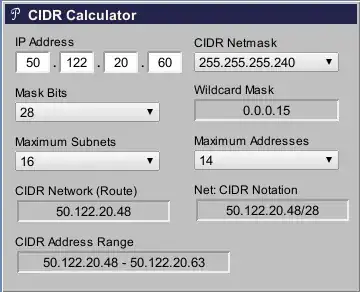
The ISP is going to be giving you a block of IP addresses. For example, the ISP might give you 50.122.20.48/28 as your IP block. This allots you 16 IPs. One for the network (.48) one for the default route (most likely .49) and broadcast IP address for the network (.63) and actual IPs to use (.50 through .62) for actual devices.
Use this CIDR calculator to determine the network topology:
So out of the back of the ISPs modem you've probably got 3-4 ethernet ports. Plug 2 wires into the back of that and those 2 wires go into ports on the Watchguard box. Then you'll need to configure each of those ports for a specific IP from the ISP. They should be perhaps 50.122.20.50 and 50.122.20.51.
Using 2 additional ethernet ports on the Watchguard box setup 2 separate class C networks say 192.168.0.0/24 and 192.168.1.0/24. One for the first tenant and the other for your customer.
You'll need to make sure that the 2 networks have firewall rules disallowing each others subnets from being routable to each other as well.
Comment if you need more info, this should get you started.


