I want to be sure in what order services are started during boot process in Debian based systems (Debian Squeeze in particular).
Asked
Active
Viewed 1.8e+01k times


6 Answers
41
In short:
ls /etc/rc*.d
This shows you what starts at which runlevel, and within each level the order is determined by the number after the letter (K is Kill, S is start).
You can configure what starts at each runlevel with sysv-rc-conf, which is installable with apt.
e.g. on my system apache2 is symlinked in rc5.d as "S20apache2". A link in the same directory with S19 would start before it, something with S21 would start after it.
Further reading:

Alex Forbes
- 2,492
21
Would rcconf and sysv-rc-conf utilities help?
# aptitude install rcconf sysv-rc-conf
Afterwards you can run them by typing rcconf or sysv-rc-conf.
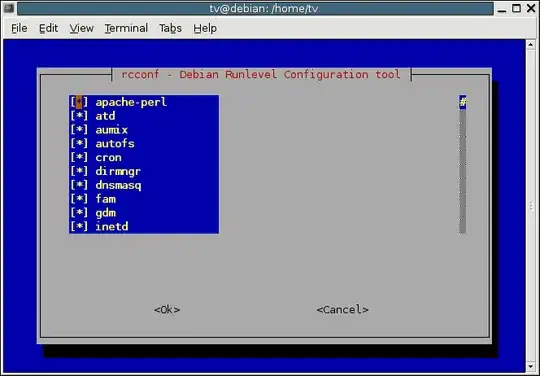
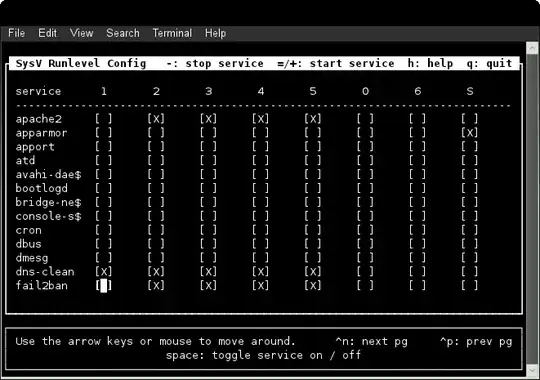

9
You can list all services and their status with this simple command:
service --status-all
From the manual:
service --status-all runs all init scripts, in alphabetical order, with the status command. The status is [ + ] for running services, [ - ] for stopped services and [ ? ] for services without a 'status' command. This option only calls status for sysvinit jobs; upstart jobs can be queried in a similar manner with initctl list.

Michael Schmid
- 105

Junix
- 99
- 1
- 3
4
for i in `find /etc/rc*.d -name S*`; do basename $i | sed -r 's/^S[0-9]+//'; done | sort | uniq

Sample output:

acpid
anacron
avahi-daemon
boa
bootlogd
bootlogs
bootmisc.sh
checkfs.sh
checkroot-bootclean.sh
checkroot.sh
cryptdisks
cryptdisks-early
dbus
delayed-services
hostname.sh
hwclock.sh
keyboard-setup
killprocs
kmod
lightdm
mountall-bootclean.sh
mountall.sh
mountdevsubfs.sh
mountkernfs.sh
mountnfs-bootclean.sh
mountnfs.sh
mtab.sh
pppd-dns
procps
qemu-kvm
rc.local
rmnologin
rsyslog
single
sleep
stop-bootlogd
stop-bootlogd-single
udev
udev-mtab
x11-common

Andrey
- 59
1
systemd
On distros using systemd, you can control the order. You have to use a combination of Requires with Before/After. Due to the parallel and relationships among services, the service start-up order isn't deterministic.
# This command prints an SVG graphic detailing which system services have been started at what time, highlighting the time they spent on initialization.
systemd-analyze plot > startup_order.svg
# to generate a graphical dependency tree.
systemd-analyze dot | dot -Tsvg > systemd.svg

Pablo A
- 210
1
On Debian rcconf should do the trick, just to configure stop/start of already present services.
I use it all the time on Debian Jessie and Wheezy.

Exnor
- 11
- 1