The block size is kind of an artifact from the olden days of the filesystems where memory and storage were precious goods so even pointers to data had to be size-optimized. MS-DOS used 12 bit wide pointers for early versions of FAT, thus allowing the management of up to 2^12 = 4096 blocks (or files). As the maximum size of the file system is inherently restricted to (max_block_size) x (max_block_number), the "right" block size has rather been an issue where you had to think about your total file system size and the amount of space you would be going to waste by choosing a larger block size.
As modern file systems would use 48-bit (ext4), 64-bit (NTFS, BTRFS) or even 128-bit (ZFS) pointers, allowing for huge (in terms of numbers of blocks) filesystems, choosing a block size has become less of an important issue unless you have a specific application and want to optimize for it. Examples might be
- block devices with large blocks where you do not want different files to "share" a single physical block as a performance optimization - large file system blocks matching the physical device block size are chosen in this case
- logging software which would write a large number of files with a fixed size where you want to optimize for storage utilization by choosing the block size to match your typical file size
As you have specifically asked for ext2/3 - by now those are rather aged file systems using 32-bit pointers, so with large devices you might have to run through the same "maximum file system size vs. space wasted" considerations I wrote about earlier.
The file system performance might suffer from large numbers of blocks used for a single file, so a larger block size might make sense. Specifically ext2 has a rather limited number of block references which can be stored directly with an inode and a file consuming a large number of blocks would have to be referenced through four layers of linked lists:
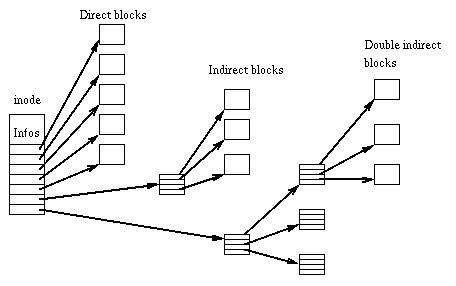
So obviously, a file with less blocks would require less reference layers and thus theoretically allow for faster access. This being said, intelligent caching is likely to cover up most of the performance aspects of this issue in practice.
Another argument often used in favor of larger blocks is fragmentation. If you have files which are growing continuously (like logs or databases), having small file system block sizes would lead to more data fragmentation on disk thus reducing the odds for larger chunks of data to be read sequentially. While this is inherently true, you should always remember that on an I/O subsystem serving multiple processes (treads / users) sequential data access is highly unlikely for general-purpose applications. Even more so if you have virtualized your storage. So fragmentation itself would not suffice as a justification for a larger block size choice for all but some corner cases.
As a general rule of thumb which is valid for any sane FS implementation, you should leave the block size at the default unless you have a specific reason to assume (or, better yet, test data showing) any kind of benefit from choosing a non-default block size.


