2

I'm currently having difficulty determining the best way to connect a Dlink DGS-3420-52T switch stack to a IBM B50G switch stack.

I have two IBM B50G switches stacked together, which then connect to our firewall and then out to the internet.

I have 5 D'Link xStack DGS-3420 series switches stacked together in a ring topology. What is the best way to connect these 5 D'Link DGS-3420 series switches to the IBM B50G stack?

Is LACP (Link Aggregation Control Protocol) going to be my best best?

How do I spread the uplink ports across the D'Link stack?

Is trying to connect these two separate stacks together a bad idea in the first place?

Any help at all would be really appreciated.

2 Answers2

0

I guess your only choice here is LACP, make some port channels between the switches in a way that makes sense in your topology, take consideration of the amount of traffic has to flow trough each of them and avoid creating bottlenecks.

Martino Dino
  • 1,165
0

from the reference documentation, it does not look like the D-Link switches would allow you to create LAGs spanning more than one physical switch, "physical" stacking enabled or not.

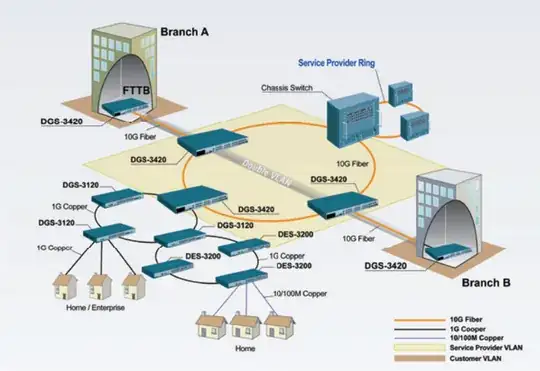
Since using just a single switch for stack interconnection would introduce a single point of failure, the route to go probably would be to use two uplinks (or uplink trunks) from the B50G / Brocade stack and make it a member in the ring like the "Chassis switch" in this picture: D-Link topology proposal (pic taken from the D-Link data sheet)

To handle loops, either let Spanning Tree disable one of the link trunks or try to make ERPS work in D-Link's stacked configuration (it is claimed to be supported and would give you shorter recovery times than STP/RSTP).

the-wabbit
  • 41,352