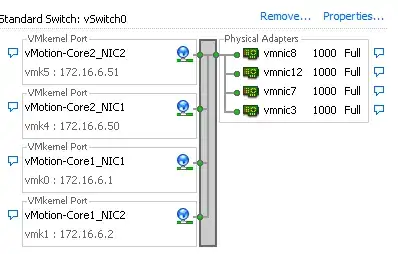
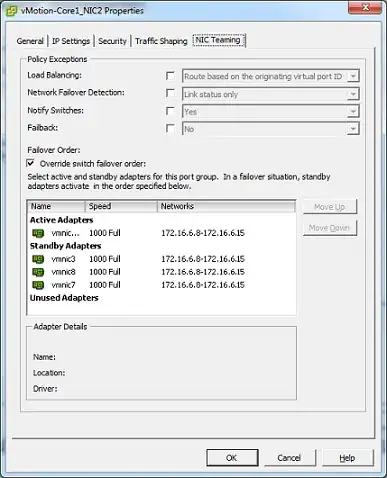
4

Having successfully followed VMware KB article setting up multi-nic vMotion, I am now struggling to get this working with a two core switches.

A single Active vmnic and a single Standby vmnic is functioning as it should.

However, the issue is due to the nature of the setup. We have 2 core switches (sets of stacked switches), in a active/passive setup connected via LACP.

How can i get this working with 2 core switches?

Working Setup

The working configuration has 1 active and 1 standby vmnics from a single Core.

Vmnic 3 & 12 are from Core 1. A second vmkernal is also setup to the opposite active an standby adapters.
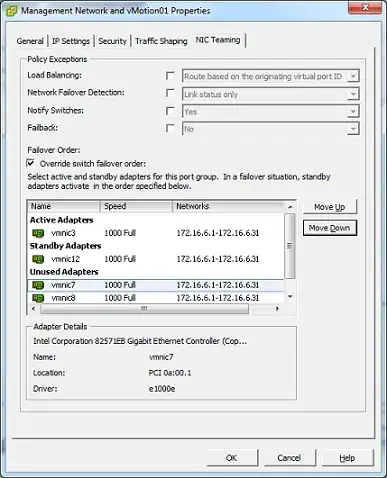
vMotion - Multi-nic

Not Working

Vmnic 7 & 8 are from Core 2. Once again, a second vmkernal is setup to reflect the opposite of active and standby adapters.
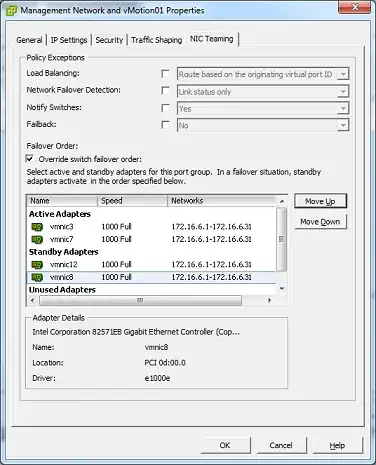
vMotion - Multi-nic Dual Core

If anyone can shed some light on this or have a plausible solution, I am in the position to test this before putting into live.

Nobody
  • 15,510
Cold T
  • 2,401

1 Answers1

1

Have found a working solution with two core stacks and using vSwitches (rather then vDS).

In one simple sentence, the key idea is to ensure you only have 1 active vmnic per port group with everything else as standby.

So therefore, for every vmnic you must have a single port group. In my case, I have two nics per core stack. Only two will ever be utilised.

PortGroups

vmnics-PortGroups

Ensure you have the IPs assigned from the same IP subnet.

Performance tab under vSphere Client easily shows both nics are being utilised.

Ultimately, this avoids any LACP/ etherchannels needing to be setup. As recommended, Jumbo frames should also be enabled for vMotion VMNics.

REF: Designing your vMotion network

Thanks goes to @Dan for pointing out the reference and pointing me toward the right direction.

Cold T
  • 2,401