40

I just installed a fresh new Windows 2012 x64 Virtual Machine.

The very first thing I did was install Google Chrome.

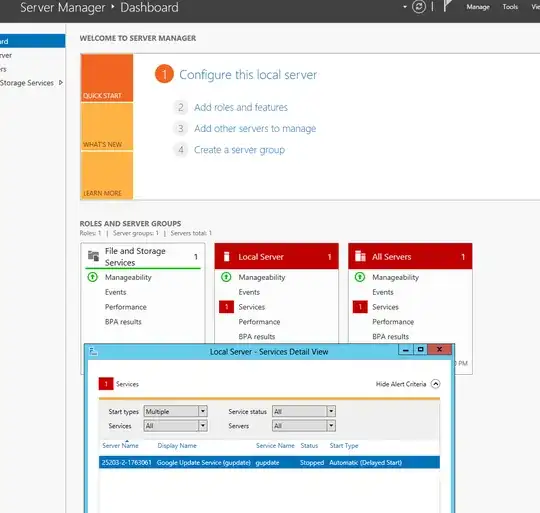
When I went to the Dashboard, I get the following error (or it's made to look like an error).

enter image description here

So,

  • Anyone know what this error is all about?
  • How can i 'fix' this?

Thank you kindly.

EDIT: Please don't suggest I uninstall G-Chrome as a fix.

Pure.Krome
  • 6,698

5 Answers5

61

Going through the Google forums, it seems like Google doesn't have any intention of "fixing" this behavior. Issue seems like that the service starts and then it stops quickly making Windows think it failed, though in reality it checks for updates (and may be other "stuff") and exits with no errors.

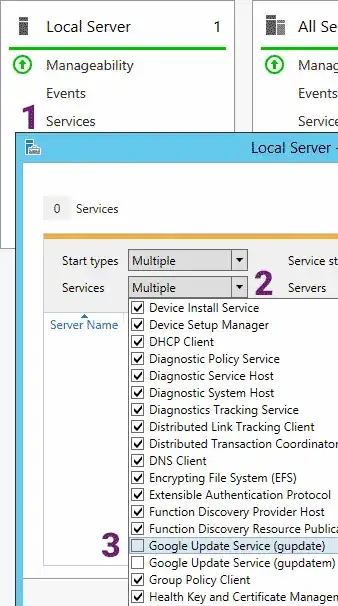
Since this is normal behavior, what I did was to remove the gupdate service from the Services drop down in the Services Detail View. This makes the Server Manager exclude it.

You'll find the checkbox in the Services Detail View, Services dropdown.

Madushan
  • 758
10

As @JScott suggested, I just changed the service from Automatic Delayed to Manual (or I could have also chosen Disabled).

And .. that fixed it.

enter image description here

Pure.Krome
  • 6,698
5

We had this issue too - tried manually starting and the service would stop automatically. Explanation of issues above was clear, so we removed the service from scope/view and are green.

Maybe I'm just a bit thick, but it took me a little while to find out how to filter the services, so I'll just add a few steps in hopes of clarify solution to others:

  1. Click the red Services link located in the Local Server group on the Server Manager Dashboard.
  2. Click the Services drop down on the Services Detail View. This will say "All" if you are not currently filtering services, it will say "Multiple" if you are already filtering
  3. Scroll down to "Google update Service (gupdate)" and un-check the box to filter it from this view.
  4. Click OK

You may have to repeat this in the "All Servers", also located on the Server Manager Dashboard.

Thank you again - this cleared our warning
Derek Manning
  • 81
  • 1
  • 1
0

For Edge Chromium, the issue is the same.

However, for some weird reason, the two services, edgeupdate and edgeupdatem, have been named by Microsoft with a leading space making them to be sorted to the top:

enter image description here

Gustav
  • 101
0

Open the Windows Run utility. You can do this by using the keyboard shortcut Windows key + R or searching for Run using Cortana.

Once it opens, type services.msc and hit enter. (You can also open this window by opening Windows Control Panel > System and Security > Administrative Tools > Services.)

Scroll down to Google Update Service (gupdate) and Google Update Service (gupdatem). Double-click each item and in the General tab under Startup Type, select Disabled from the dropdown menu and click OK.

Xin Li
  • 1