19

I need to run Cisco AnnyConnect from a VM in a data center. When I run it I get this message:

Vpn establishment capability from a remote desktop is disabled

Can this be turned off? I saw some posts about it, but required downloading Cisco software with an account, which I do not have. The VPN software is from a client I work for.

Vadzim
  • 278
Daniel Williams
  • 358
  • 1
  • 3
  • 15

5 Answers5

16

I've found a workaround for this problem when there is no access to VPN server settings:

  • set up Teamviewer
  • disconnect RDP
  • connect via Teamviewer
  • connect to VPN in remote session
  • disconnect Teamviewer
  • connect via RDP
  • continue working as used to
Vadzim
  • 278
12

It really depends on the version you are using, but nowadays this is done by creating an AnyConnect Client Profile on the ASA itself.

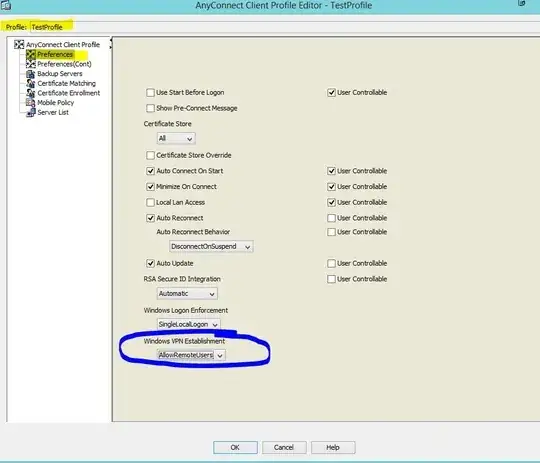
By default the policy will be set to LocalUsersOnly and you need to change it to AllowRemoteUsers.

You'll need access to the ASA though (ASDM) in order to do this.

The steps would be:

  1. Log into the ASDM
  2. Go to Configuration, Remote Access VPN, Anyconnect Client Profile
  3. Click Add and create a new profile and choose the Group Policy it should apply to
  4. Click OK, and then at the Profile screen click "Apply" at the bottom (important)
  5. Now edit the profile, and you should see under the Preferences, Windows VPN Establishment you can select "AllowRemoteUsers" and hit OK
  6. Apply once more and then save/writemem
  7. That's it, RDP and try again

ASA config

If you don't have access to the ASA, the best I can suggest is to use a different type of remote connection like VNC or Teamviewer as they will allow you to use the VPN.

TheCleaner
  • 33,047
10

Connect to your computer via RDP. Create connect.dat file as following, finishing it with extra empty line (must-have requirement, sic!):

connect your-VPN-server-here
your-username-here
your-password-here

Then create connect.cmd file as following

for /f "tokens=3 delims= " %%G in ('tasklist /FI "IMAGENAME eq tasklist.exe" /NH') do SET RDP_SESSION=%%G
Rundll32.exe user32.dll, LockWorkStation
tscon.exe %RDP_SESSION% /dest:console
"C:\Program Files (x86)\Cisco\Cisco AnyConnect Secure Mobility Client\vpncli.exe" -s <connect.dat

Correct the path to vpncli.exe if necessary. Then terminate VPN UI process (it shouldn't be loaded into memory) and start our CMD file as a local admin.

If you don't mind, full note is here http://windowsasusual.blogspot.ru/2016/10/cisco-anyconnect-vpn-and-remote-desktop.html

8

I found a solution to make it work. My work laptop need to be connected to a vpn with cisco any connect . And I wanted to connect to my work laptop using remote desktop to have a better experience with my home PC mouse and keyboard and a bigger screen.

I had this error after the VPN was connecting: Vpn establishment capability from a remote desktop is disabled.

Start the VPN on the laptop first then use RDP

I could solve this issue by starting the VPN connection on my laptop first. Once the connection is established, I logged on with remote desktop on my laptod and its working!

Hope this helps

codea
  • 181
5

The fix for this issue is start the VPN session using the "Basic mode" (disabling the "Enhanced session" option). It worked for me. Look this post:

https://foxdeploy.com/2015/11/20/solved-cisco-anyconnect-session-ended-error/

Cory Knutson
  • 1,886