7

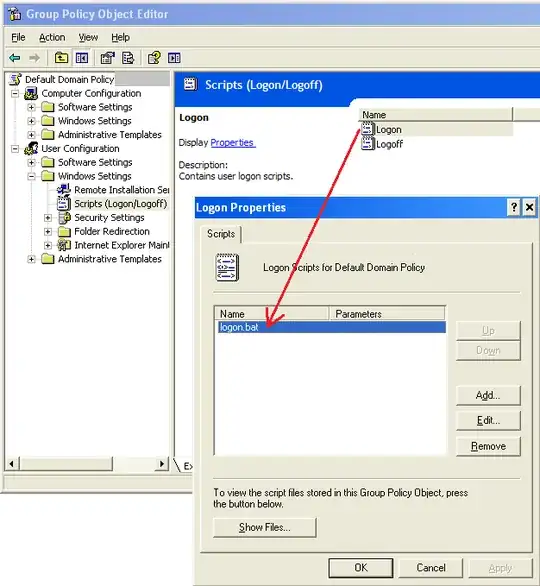
We have a batch file (logon.bat) that maps drives whenever a user logs on.

This script is applied by Group Policy to the entire domain.

Initially, this worked perfectly, as we always wanted this script to be applied. However, now we have PCs at a remote site accessing the domain via a VPN link. These PCs can take as long as 5 minutes to log on due to the combination of the drive mapping script and the slow VPN link. I experimented by removing "logon.bat" from the "Default Domain Policy" GPO, and users at the remote site could log on a few minutes faster. This is perfect- I can manually map drives at the remote site for the small number of users who need network access there.

What I then tried to do, was to create two OUs: "Main office" (where we want to continue to use the drive mapping script), and "Off-site" (for the remote site, and also laptops which are domain-joined).

The only problem is that, when I remove the reference to "logon.bat" from the "Default Domain Policy" GPO, and add it to the "Map drives at logon" GPO applied to "Main office", it no longer gets applied to the main office. I can't selectively apply drive mapping only to users at the main site.

We can't keep using an all-or-nothing approach to this logon script any more because of the performance impact it has to users working remotely.

Does anyone have any idea why the drive mapping stops working when I try to get a different GPO to handle it?
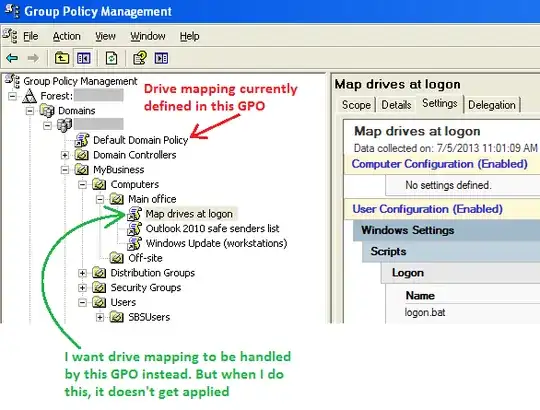
enter image description here

enter image description here

4 Answers4

10

As mentioned, you have user policy settings being set to computer accounts. By default, this won't work.

You can get it working this way by enabling Loopback mode processing on the policy you are creating to process the settings for users logging into those computers. Loopback Processing will allow the user policy settings to be applied on a policy applied to a computer account.

Please note that enabling loopback mode will enable it on all policies in that OU applied after the policy enabling loopback mode.

Rex
  • 7,945
6

You have a user policy being bound to a computer OU. The settings need to match up to the contents of the OU they are bound to.

Tim Brigham
  • 15,655
3

A logon script is a user policy. It won't apply to computers that you put in that OU, because it applies to users.

MDMarra
  • 101,323
2

As other answers have stated, user policies don't apply to computers, but you can use loopback processing mode to allow this.

How much bandwidth do you have between the sites, and how many users/computers are at the remote site?

I suspect the delays you are seeing aren't due to the policies you are applying, but actually because you are mapping network drives over a slow WAN link.


I can't tell from the detail in your question, but if you haven't already, you'd see a big improvement if you installed a domain controller at your remote site, configured an AD site & subnet, and set up DFSR to replicate your network shares between the two sites.

We've been running a similar set up since around 2006, replicating around 500GB of data between two file servers with a bandwidth of no more than a theoretical maximum of 384Kbps. Depending on how much data/bandwidth you have, I'd recommend kicking off the initial replication with the remote site server located at the main office, otherwise you could be waiting a long time for the initial sync to complete.