3

I'm the resident IT guy in an office with about 20 workers, amongst 3 separate companies who sublet an office.

We are wired with 24 ethernet ports dotted around the offices that all lead to a patch panel in my office. They are connected to 4 unmanaged switches into our ISP-supplied, cheap, router. (Internet is provided by a regular ADSL2+ provided by BT in the UK).

The problem is we are all one network, despite being separate companies, which is a security concern so we want to separate the logical/virtual networks (presumably, VLANs), but our current basic router doesn't support port-based VLANs.

I'm consider two options to isolate the networks, and I'd like advice which will do the trick:

  1. A enterprise 4-port router (perhaps a Zyxel P660HN-51 or Draytek Vigor) that supports port-based VLANs, and plug our existing unmanaged switches into that:
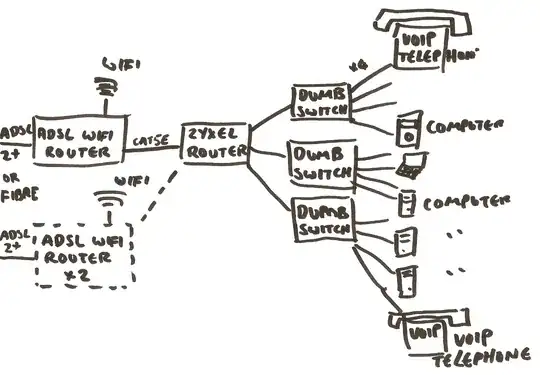
    4-port router and unmanaged switches (obviously, I would restricted to 3-4 VLANs, but that's fine

  2. Or, a large 24-port managed switch (like a Cisco), that supports allows me to define which of it's many ports belong to which VLANs.
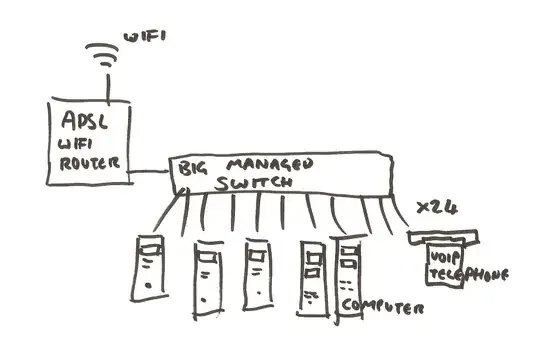
    ADSL router and managed network I understand that this can just work in a "router-on-a-stick" configuration. Crucially, my network cupboard is too small to fit a typical 24 port switch, It's only got about 22cm depth.

Ash
  • 169

3 Answers3

4

As long as the companies only share the internet connection and have no need to share other resources (like file servers), I clearly would favor option 1.

If you have separate companies and have become the administrator by chance rather than an external, binding decision for every of the companies, one of the things you would want most would be a clean, well-defined interface / point of transfer. This is what you get by having a single uplink port towards a router with an own subnet (better yet, an own public IPv4 address / IPv6 subnet and another router for them to administer). Each of the companies could choose its own switch and, more importantly, its own administrator for this switch.

If you choose to use option 2, the main disadvantage will be that you will be the contact person for everything for ever. Even if any of the companies are going to employ an own administrator, there is a good chance that it always will be you who is obstructing things, breaking things or not doing things right in their opinion. Expect even a broken toilet flush to be within your responsibility.

the-wabbit
  • 41,352
3

Option 2 - will give you the opportunity to buy a L3 switch with more capability, capacity, flexibility and resilience than option 1. Overall performance will is likely to be higher, you'll have the option to use PoE ports for the phones if you wish and you'll have the option to run some form of network management tool tool so you know what's going on and where.

Option 1 is going to keep you busy, but it's obviously cheaper than option 2.

Chopper3
  • 101,808
3

I would favor Option 3 personally:

  • Install a proper "Big Managed Switch" like you have in Option 2
  • Put each company in their own VLAN.
  • For the uplinks you have a few choices:
    • Give each company their own uplink (modem, etc.) inside their vLAN like you have in Option 1.
    • Install a decent firewall like PFSense with an interface in each vLAN and funnel all your traffic through one modem (like you have in option 2)
    • Install a decent firewall with an interface in each vLAN and some crafty traffic rules to separate some users onto their own uplinks and have everyone else use a shared link.

(A decent firewall would also let you establish rules so the companies can access each other's resources as-needed, as well as giving you the ability to run monitoring/administration software that can see into all of the networks).

This is definitely an expensive alternative, but the flexibility is such that it's worth it if you're going to be holding this job for a while.

voretaq7
  • 80,749