Is there a way to see /log which cipher suites are (actively) being used to establish SSL connections on Windows Server 2008 R2?
Ideally on a per request basis, like an extra column in the IIS logs.
Asked
Active
Viewed 9,000 times
8

Frederik
- 183
1 Answers
8
IIS logs won't help you here, since the SSL connection is negotiated before any HTTP/application layer traffic starts flowing.
But what you can do is:
C:\Windows\system32>netsh trace start capture=yes

Trace configuration:
-------------------------------------------------------------------
Status:             Running
Trace File:         C:\Users\Ryan\AppData\Local\Temp\NetTraces\NetTrace.etl
Append:             Off
Circular:           On
Max Size:           250 MB
Report:             Off


C:\Windows\system32>netsh trace stop
Correlating traces ... done
Generating data collection ... done
The trace file and additional troubleshooting information have been compiled as "C:\Users\Ryan\AppData\Local\Temp\NetTraces\NetTrace.cab".
File location = C:\Users\Ryan\AppData\Local\Temp\NetTraces\NetTrace.etl
Tracing session was successfully stopped.
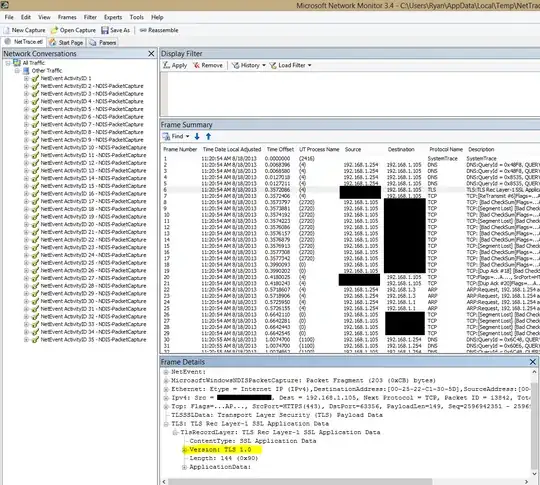
You can open that ETL file with Windows Performance Analyzer, and also with NetMon. (The latter will likely be more useful to you.)
Here's a screenshot of that trace file I just generated:
(Open in new tab to see fullsize)
Edit: To find the exact cipher mode being used, locate the "HandShake: Server Hello" packets:
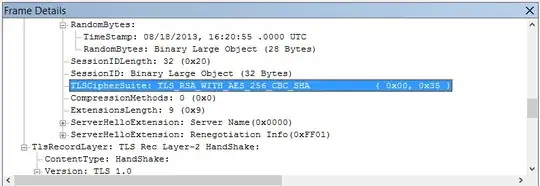
Here is a Microsoft support article telling you how to interpret the bytes of the packet manually, but Netmon will do it for you.
You could come up with a packet trace filter that only contained packets of this nature. If there's a better way to get this data I'd like to know about it.

Ryan Ries
- 56,311