28

Recently I was at a local user group meeting where the presenter noted that the maximum throughput of the NTFS IO stack was 1 GBps. He substantiated his claim by simultaneously copying two large files from the same logical volume to different logical volumes (i.e. [a] is the source, [b] is destination 1 and [c] is destination 2) and noting the transfer rates hovering around 500 MBps. He repeated this test a few times and noted that the underlying storage subsystem was flash (to make sure we didn't suspect slow storage).

I've been trying to verify this assertion but cannot find anything documented. I suspect that I'm searching for the wrong search terms ("1GBps NTFS throughput", "NTFS throughput maximum"). I'm interested in whether or not the IO stack is actually limited to 1GBps throughput.

EDIT

To clarify: I do not believe the presenter intended to imply that NTFS was intentionally limited (and I'm sorry if I implied that as well). I think it was implied that it was a function of the design of the filesystem.

HopelessN00b
  • 54,273
swasheck
  • 713

7 Answers7

37

Even assuming you meant GBps and not Gbps...

I am unaware of any filesystem that has an actual throughput limit. Filesystems are simply structures around how to store and retrieve files. They use metadata, structure, naming conventions, security conventions, etc. but the actual throughput limitations are defined by the underlying hardware itself (typically a combination of lots of hardware involved).

Comparing different filesystems and how they affect performance of the underlying hardware can be done, but again that isn't a limitation directly imposed by the filesystem but more of a "variable" in the overall performance of the system.

Choosing to deploy one filesystem over another is typically related to what the underlying OS is, what the server/application is going to be, what the underlying hardware is, and soft factors such as the admin's areas of expertise and familiarity.

==================================================================================

TECHNICAL RESOURCES AND CITATIONS


Optimizing NTFS

NTFS Performance Factors

You determine many of the factors that affect an NTFS volumes' performance. You choose important elements such as an NTFS volume's type (e.g., SCSI, or IDE), speed (e.g., the disks' rpm speed), and the number of disks the volume contains. In addition to these important components, the following factors significantly influence an NTFS volume's performance:

  • The cluster and allocation unit size
  • The location and fragmentation level of frequently accessed files, such as the Master File Table (MFT), directories, special files containing NTFS metadata, the paging file, and commonly used user data files
  • Whether you create the NTFS volume from scratch or convert it from an existing FAT volume
  • Whether the volume uses NTFS compression
  • Whether you disable unnecessary NTFS behaviors

Using faster disks and more drives in multidisk volumes is an obvious way to improve performance. The other performance improvement methods are more obscure and relate to the details of an NTFS volume's configuration.


Scalability and Performance in Modern File Systems

Unfortunately, it is impossible to do direct performance comparisons of the file systems under discussion since they are not all available on the same platform. Further, since available data is necessarily from differing hardware platforms, it is difficult to distinguish the performance characteristics of the file system from that of the hardware platform on which it is running.


NTFS Optimization

New white paper providing guidance for sizing NTFS volumes

What's new in NTFS

Configuring NTFS file system for performance

https://superuser.com/questions/411720/how-does-ntfs-compression-affect-performance

Best practices for NTFS compression in Windows

TheCleaner
  • 33,047
11

I very much doubt there is a data transfer bottleneck related to a filesystem, because filesystems don't dictate implementation details that would hard-limit performance. A given driver for a filesystem on a particular config of hardware will have bottlenecks of course.

mfinni
  • 36,892
7

I would be very surprised if this was true. Let's look at everything that can slow down a filesystem:

  • The physical media (disk, ssd)
  • Connection to this media (sas, sata, fcal)
  • Fragmentation
  • Bad locking algorithms or other code issues
  • CPU and memory speed

The most common limiting factor is your physical media. Rotating rust is SLOW. Take for instance this really new disk which has a maximum speed of 6 Gbps (that's Gbps, not GBps!). Of course using a raid 1 setup will speed this up. Of course you'll never achieve this, as seeks kill your performance. So let's use an SSD you say? Oh look at that, 6Gb again.

Then there's the connection: sas (the fastest local storage) goes up to 6 Gbps, FC goes up to 16Gbps though.

Are you sure your demo was using such high end, state of the art, hardware?

If you are: interesting! You may have hit case 3 and your filesystem needs some optimizing. Or more likely your drivers and application are eating up your CPU (5). If neither of those are though, you may have hit upon an actual performance issue in NTFS, please report it to microsoft.

And even then: this is not an artificial limit, put in place to make your life more miserable. Filesystems don't intentionally limit transfer speeds, but are limited by whatever your hardware can give you.

7

I don't think there is a maximum. But I know it's more than 1 GB/s because the people at Samsung did 2121.29 MB/s read and 2000.195 MB/s write with their 2009 rig with 24 SSD drives http://www.youtube.com/watch?v=96dWOEa4Djs

They think they hit that limit because this was the combined total hardware bandwidth of the controller cards the SSDs were plugged in to.

Also this page http://blog.laptopmag.com/faster-than-an-ssd-how-to-turn-extra-memory-into-a-ram-disk shows a RAM disk formatted with NTFS getting 5 to 7 GB/s. Try it yourself with one of the RAMdisk titles listed on http://en.wikipedia.org/wiki/List_of_RAM_drive_software

4

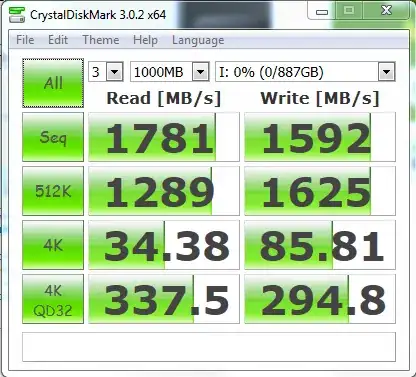
There's no need to theorize whether or not there's a 1 GBps limit to NTFS--modern SSDs already surpass this. The test bench is a Windows desktop.

enter image description here

Jason
  • 728
3

The only logical way to compare filesystem limits would be to do so across systems where the constant was the filesystem and the variables were the other factors such as devices, connections, etc. Using one system to compare transfer speeds over several iterations prove only that the particular system was limited, not that the filesystem was limited.

Richard_G
  • 129
1

There is no built - in throughput limit in NTFS. The only constraint on speed is the performance characteristics of the underlying hardware.

longneck
  • 23,272