Typically m/a/c to phones like registering/unregistering etc. can be done through the PBX admin interfaces themselves. Most phones also allow you to enter "codes" on the phones for manual registration/de-registration if you choose to do so.
It's probably unlikely that you'll get a lot of telecom help here, so I'm posting this as possibilities from my google-fu:
1. Press PROGRAM * * or PROGRAM * # followed by the system password ( default is 1234).
2. Now press 004 and then ENTER.
3. Enter the extension number you want to change.
4. Enter the name (the same way as texting on a cellphone)
5. To save the changes press AUTO DIAL / STORE.
6. To go to the next extension press NEXT on the screen.
7. Lift the handset and put it down to exit program mode.
and looking here:
http://www.americasphoneguys.com/resources.html
There's some resources based on the various models and PBX's involved. Honestly though, if you don't have a telecom resource that knows your system enough to even move a single phone extension to another desk, then you really need to get trained on doing these basic m/a/c's in-house.
EDIT: http://www.americasphoneguys.com/images/kx-ncp_userguide.pdf
According to that document the below will program an existing extension to be a new extension:
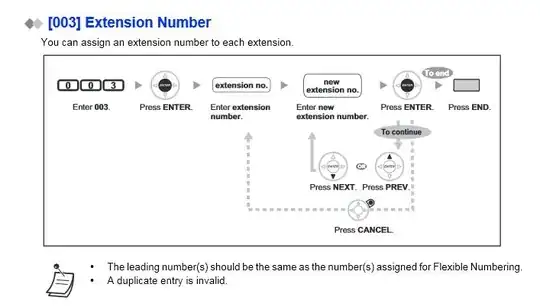
Also see here, where they describe something called "walking extension":
http://www.kxtsystem.com/NCP/data/fm_ncp1000/id_fm_ncp1000_0459.htm


