I have a Nagios server and a monitored server. On the monitored server:
[root@Monitored ~]# netstat -an |grep :5666
tcp        0      0 0.0.0.0:5666                0.0.0.0:*                   LISTEN
[root@Monitored ~]# locate check_kvm
/usr/lib64/nagios/plugins/check_kvm
[root@Monitored ~]# /usr/lib64/nagios/plugins/check_kvm -H localhost
hosts:3 OK:3 WARN:0 CRIT:0 - ab2c7:running alpweb5:running istaweb5:running
[root@Monitored ~]# /usr/lib64/nagios/plugins/check_nrpe -H localhost -c check_kvm
NRPE: Unable to read output
[root@Monitored ~]# /usr/lib64/nagios/plugins/check_nrpe -H localhost
NRPE v2.14
[root@Monitored ~]# ps -ef |grep nrpe
nagios   21178     1  0 16:11 ?        00:00:00 /usr/sbin/nrpe -c /etc/nagios/nrpe.cfg -d
[root@Monitored ~]#
On the Nagios server:
[root@Nagios ~]# /usr/lib64/nagios/plugins/check_nrpe -H 1.1.1.159 -c check_kvm
NRPE: Unable to read output
[root@Nagios ~]# /usr/lib64/nagios/plugins/check_nrpe -H 1.1.1.159
NRPE v2.14
[root@Nagios ~]#
When I check another server in the network using the same command it works:
[root@Nagios ~]# /usr/lib64/nagios/plugins/check_nrpe -H 1.1.1.80 -c check_kvm
hosts:4 OK:4 WARN:0 CRIT:0 - karmisoft:running ab2c4:running kidumim1:running travel2gether1:running
[root@Nagios ~]#
Running the check locally using Nagios account:
[root@Monitored ~]# su - nagios
-bash-4.1$ /usr/lib64/nagios/plugins/check_kvm
hosts:3 OK:3 WARN:0 CRIT:0 - ab2c7:running alpweb5:running istaweb5:running
-bash-4.1$
Running the check remotely from the Nagios server using Nagios account:
-bash-4.1$ /usr/lib64/nagios/plugins/check_nrpe -H 1.1.1.159 -c check_kvm
NRPE: Unable to read output
-bash-4.1$ /usr/lib64/nagios/plugins/check_nrpe -H 1.1.1.159
NRPE v2.14
-bash-4.1$
Running the same check_kvm against a different server in the network using Nagios account:
-bash-4.1$ /usr/lib64/nagios/plugins/check_nrpe -H 1.1.1.80 -c check_kvm
hosts:4 OK:4 WARN:0 CRIT:0 - karmisoft:running ab2c4:running kidumim1:running travel2gether1:running
-bash-4.1$
Permissions:
-rwxr-xr-x. 1 root root 4684 2013-10-14 17:14 nrpe.cfg (aka /etc/nagios/nrpe.cfg)
drwxrwxr-x. 3 nagios nagios 4096 2013-10-15 03:38 plugins (aka /usr/lib64/nagios/plugins)
/etc/sudoers:
[root@Monitored ~]# grep -i requiretty /etc/sudoers
#Defaults    requiretty
iptables/selinux:
[root@Monitored xinetd.d]# service iptables status
iptables: Firewall is not running.
[root@Monitored xinetd.d]# service ip6tables status
ip6tables: Firewall is not running.
[root@Monitored xinetd.d]# grep disable /etc/selinux/config
#     disabled - No SELinux policy is loaded.
SELINUX=disabled
[root@Monitored xinetd.d]#
The command in /etc/nagios/nrpe.cfg is:
[root@Monitored ~]# grep kvm /etc/nagios/nrpe.cfg
command[check_kvm]=sudo /usr/lib64/nagios/plugins/check_kvm
and the nagios user is added on /etc/sudoers:
nagios  ALL=(ALL) NOPASSWD:/usr/lib64/nagios/plugins/check_kvm
nagios  ALL=(ALL) NOPASSWD:/usr/lib64/nagios/plugins/check_nrpe
The check_kvm is a shell script, looks like that:
#!/bin/sh

LIST=$(virsh list --all | sed '1,2d' | sed '/^$/d'| awk '{print $2":"$3}')

if [ ! "$LIST" ]; then
  EXITVAL=3 #Status 3 = UNKNOWN (orange)
  echo "Unknown guests"
  exit $EXITVAL
fi

OK=0
WARN=0
CRIT=0
NUM=0

for host in $(echo $LIST)
do
  name=$(echo $host | awk -F: '{print $1}')
  state=$(echo $host | awk -F: '{print $2}')
  NUM=$(expr $NUM + 1)

  case "$state" in
    running|blocked) OK=$(expr $OK + 1) ;;
    paused) WARN=$(expr $WARN + 1) ;;
    shutdown|shut*|crashed) CRIT=$(expr $CRIT + 1) ;;
    *) CRIT=$(expr $CRIT + 1) ;;
  esac
done

if [ "$NUM" -eq "$OK" ]; then
  EXITVAL=0 #Status 0 = OK (green)
fi

if [ "$WARN" -gt 0 ]; then
  EXITVAL=1 #Status 1 = WARNING (yellow)
fi

if [ "$CRIT" -gt 0 ]; then
  EXITVAL=2 #Status 2 = CRITICAL (red)
fi

echo hosts:$NUM OK:$OK WARN:$WARN CRIT:$CRIT - $LIST

exit $EXITVAL
Edit (10/22/13): Following all that, I am now able to get some response from the script:
[root@Monitored ~]# /usr/lib64/nagios/plugins/check_nrpe -H localhost -c check_kvm
Unknown guests
[root@Monitored ~]# /usr/lib64/nagios/plugins/check_nrpe -H localhost
NRPE v2.14
[root@Monitored ~]# /usr/lib64/nagios/plugins/check_kvm
hosts:3 OK:3 WARN:0 CRIT:0 - ab2c7:running alpweb5:running istaweb5:running
[root@Monitored ~]# su - nagios
-bash-4.1$ /usr/lib64/nagios/plugins/check_kvm
hosts:3 OK:3 WARN:0 CRIT:0 - ab2c7:running alpweb5:running istaweb5:running
-bash-4.1$ /usr/lib64/nagios/plugins/check_nrpe -H localhost -c check_kvm
Unknown guests
-bash-4.1$ /usr/lib64/nagios/plugins/check_nrpe -H localhost
NRPE v2.14
It seems like the problem is some how related to the check_nrpe command or something which is related to the nrpe installation on the server.
Edit 12/2/13:
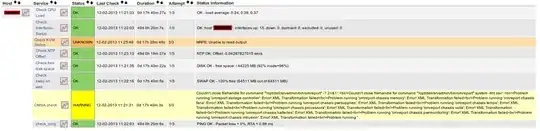
Other checks on the problematic server work: