In an effort to circumvent compatibility and cost barriers to using SSD drives with newer HP ProLiant Gen8 servers, I'm working to validate PCIe-based SSDs on the platform. I've been experimenting with an interesting product from Other World Computing called the Accelsior E2.
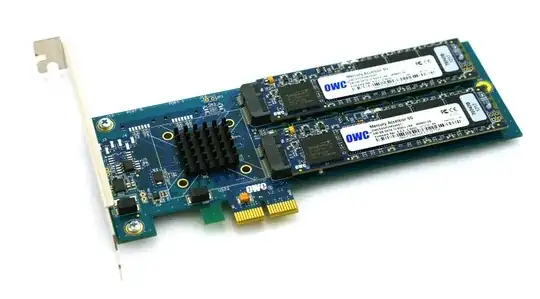
This is a basic design; a PCIe card with a Marvell 6Gbps SATA RAID controller and two SSD "blades" connected to the card. These can be passed-through to the OS for software RAID (ZFS, for instance) or leveraged as a hardware RAID0 stripe or RAID1 mirrored pair. Nifty. It's really just compacting a controller and disks into a really small form-factor.
The problem:
Look at that PCIe connector. That's a PCie x2 interface. Physical PCIe slot/lane sizes are typically x1, x4, x8 and x16, with electrical connections usually being x1, x4, x8 and x16. That's fine. I've used x1 cards in servers before.
I started testing the performance of this card on a booted system and discovered that read/write speeds where throttled to ~410 MB/s, regardless of server/slot/BIOS configuration. The servers in use were HP ProLiant G6, G7 and Gen8 (Nehalem, Westmere and Sandy Bridge) systems with x4 and x8 PCIe slots. Looking at the card's BIOS showed that the device negotiated: PCIe 2.0 5.0Gbps x1 - So it's only using one PCIe lane instead of two, thus only half the advertised bandwidth is available.
Is there any way to force a PCIe device to run at a different speed?
My research shows that PCIe x2 is a bit of an oddball lane width... The PCI Express standard apparently does not require compatibility with x2 lane widths, so my guess is that the controllers on my servers are falling back to x1... Do I have any recourse?
Abbreviated lspci -vvv output. Note the difference between the LnkSta and LnkCap lines.
05:00.0 SATA controller: Marvell Technology Group Ltd. Device 9230 (rev 10) (prog-if 01 [AHCI 1.0])
        Subsystem: Marvell Technology Group Ltd. Device 9230
        Control: I/O+ Mem+ BusMaster+ SpecCycle- MemWINV- VGASnoop- ParErr+ Stepping- SERR+ FastB2B- DisINTx+
        Status: Cap+ 66MHz- UDF- FastB2B- ParErr- DEVSEL=fast >TAbort- <TAbort- <MAbort- >SERR- <PERR- INTx-
                DevSta: CorrErr+ UncorrErr- FatalErr- UnsuppReq+ AuxPwr- TransPend-
                LnkCap: Port #0, Speed 5GT/s, Width x2, ASPM L0s L1, Latency L0 <512ns, L1 <64us
                        ClockPM- Surprise- LLActRep- BwNot-
                LnkCtl: ASPM Disabled; RCB 64 bytes Disabled- Retrain- CommClk+
                        ExtSynch- ClockPM- AutWidDis- BWInt- AutBWInt-
                LnkSta: Speed 5GT/s, Width x1, TrErr- Train- SlotClk+ DLActive- BWMgmt- ABWMgmt-
                LnkCtl2: Target Link Speed: 5GT/s, EnterCompliance- SpeedDis-
        Kernel driver in use: ahci
        Kernel modules: ahci