I need a little help dealing with ddos. I'm experiencing 1gb ddos attack on my server and I don't know how to stop it. (1gbs is the maximum speed of the server.)
I've the following iptables rules:
 iptables -A INPUT -m state --state ESTABLISHED,RELATED -j ACCEPT
 iptables -A INPUT -p tcp --dport 22 -j ACCEPT
 iptables -A INPUT -p tcp --dport 80 -j ACCEPT
 iptables -A INPUT -p tcp --dport 8080 -j ACCEPT
 iptables -A INPUT -i lo -j ACCEPT
 iptables -A INPUT -j DROP
however with tcpdump I can see packets coming from from port 53
12:14:40.341410 IP 195.137.162.149 > x.x.x.x: ip-proto-17
12:14:40.341411 IP 193.169.188.52.53 > x.x.x.x.23495: 23454- 0/4/6 (234)
12:14:40.341414 IP 195.248.88.120 > x.x.x.x: ip-proto-17
12:14:40.341416 IP 193.19.184.42.53 > x.x.x.x.50529: 26701| 6/0/1 TXT[|domain]
12:14:40.341418 IP 192.41.13.71.53 > x.x.x.x.10634: 23454| 6/0/1 TXT[|domain]
12:14:40.341418 IP 50.97.53.214.53 > x.x.x.x.65437: 23454| 6/0/1 TXT[|domain]
12:14:40.341419 IP 192.3.130.149.53 > x.x.x.x.57519: 24820| 6/0/1 TXT[|domain]
12:14:40.341438 IP 195.182.58.136 > x.x.x.x: ip-proto-17
12:14:40.341441 IP 193.234.216.12 > x.x.x.x: ip-proto-17
12:14:40.341442 IP 195.228.85.145.53 > x.x.x.x.7903: 37969| 6/0/1 TXT[|domain]
12:14:40.341512 IP 192.195.177.60.53 > x.x.x.x.42871: 57501- 0/13/23 (718)
12:14:40.341552 IP 192.210.150.10.53 > x.x.x.x.41447: 25994| 6/0/1 TXT[|domain]
12:14:40.341556 IP 193.28.177.41 > x.x.x.x: ip-proto-17
iptables -xnvL
Chain INPUT (policy ACCEPT 0 packets, 0 bytes)
    pkts      bytes target     prot opt in     out     source               destination
  415575 293176304 ACCEPT     all  --  *      *       0.0.0.0/0            0.0.0.0/0            state ESTABLISHED
   24101  1323153 ACCEPT     tcp  --  *      *       0.0.0.0/0            0.0.0.0/0            tcp dpt:80
   19725  1182436 ACCEPT     tcp  --  *      *       0.0.0.0/0            0.0.0.0/0            tcp dpt:8080
       2      104 ACCEPT     all  --  lo     *       0.0.0.0/0            0.0.0.0/0
13101233 35329988490 DROP       all  --  *      *       0.0.0.0/0            0.0.0.0/0

Chain FORWARD (policy ACCEPT 0 packets, 0 bytes)
    pkts      bytes target     prot opt in     out     source               destination

Chain OUTPUT (policy ACCEPT 488686 packets, 518540789 bytes)
    pkts      bytes target     prot opt in     out     source               destination
in nginx i've
limit_req_zone $binary_remote_addr zone=one:10m rate=5r/s;
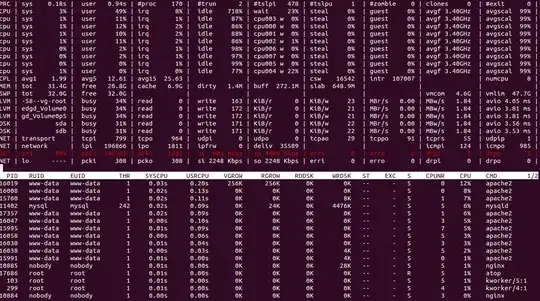
in this screenshot you can see the actual numbers. my normal usage is no more than 5mb/sec.
netstat -ntu | awk '{print $5}' | cut -d: -f1 | sort | uniq -c | sort -n | tail | grep -v "127.0.0"
 13 87.149.x.x
 14 95.68.x.x
 15 109.186.x.x
 15 84.108.x.x
 15 91.231.x.x
 17 162.17.x.x
 18 82.212.x.x
 82 151.248.x.x
 94 79.180.x.x


