When building a VM, you can select which virtual device type you would like a vNIC to be (E1000, VMXNET3, etc).
After the VM is created, can you change the type of vNIC in use on a given connection (eg from E1000 to VMXNET3)?
If so, how?
When building a VM, you can select which virtual device type you would like a vNIC to be (E1000, VMXNET3, etc).
After the VM is created, can you change the type of vNIC in use on a given connection (eg from E1000 to VMXNET3)?
If so, how?
Yes, you can change the type.
Use the Set-NetworkAdapter powercli cmdlet. The "Type" switch allows you to modify adapter. Note that the VM has to be turned off to do this.
https://www.vmware.com/support/developer/PowerCLI/PowerCLI41U1/html/Set-NetworkAdapter.html
vSphere PowerCLI can be downloaded here:
https://my.vmware.com/group/vmware/details?downloadGroup=VSP510-PCLI-510&productId=285
It can be installed on any Windows machine that has network access to the ESXi server. I typically install it directly on my laptop/workstation where I also have vSphere installed.
After installing, open it up. Use Connect-VIServer to connect to your ESXi host. It will prompt you for server ip, and credentials.
Use Get-VM to retrieve the list of VMs on the ESXi host. Confirm the one you want to change is there, and note the exact name.
Use this command to change the adapter, replacing server name with exact name from the Get-VM list and type with the adapter type you want:
get-vm 'myserver'|get-networkadapter|set-networkadapter -type e1000
Note that if the VM has multiple NICs you may need another switch in the command to specify the correct one.

As you might be learning there are a number of ways to change the adapter type. One caveat to remember relates to MAC address generation.
When you create a virtual NIC there are two options related to the MAC address:
If you are using auto-generated MACs then changing the adapter type results in the address being regenerated. This means that any configurations you have, on the guest or the network infrastructure itself, that rely on a MAC address will fail. So if you change the adapter type you must let if autogenerate a new MAC address or manually set your own. You cannot, however, manually set the old address as the interface as ESX reserves this prefix for it's own purposes.
WARNING WARNING WHEN THIS FAILS BLAME ONLY YOURSELF
An alternative that I have used is to manually edit the virtual machine's configuration file. This method requires SSH be enabled on the ESX host and you be willing to bypass all the data integrity protections that using a GUI or API provide.
Before you do any of these steps make sure the guest is powered off and the settings window is closed.
/vmfs/volumes/datastore1/testvm.priv/testvm.priv.vmxvi /vmfs/volumes/datastore1/testvm.priv/testvm.priv.vmxethernet0.virtualDev = "e1000"e1000 to vmxnet3Now you will have changed the virtual NIC device type without having to change the MAC address.

I don't think it's productive to suggest a PowerCLI or scripting solution to this question... Too many assumptions about the surrounding infrastructure for what's a 30-second manual fix.
The answer is that you really shouldn't change the type of adapter in-flight. The more accepted process is to remove the existing adapter and add a new adapter of the type you desire.
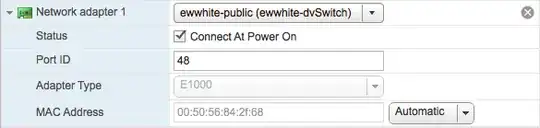
existing E1000 NIC attached to a VM
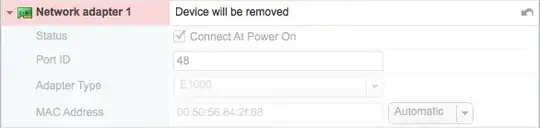
remove the E1000 NIC
add a new Network device

specify the type of adapter to be used in the new network device

In your operating system, reconfigure network settings.

You cannot change the type, but you can easily delete the unwanted type and add a new vNIC of the wanted type.

