4

I want to run Hyper-V manager on a virtual machine running Windows 2012 Server essentials.

I've seen videos of others using the Server Manager to add this feature to their Windows 2012 Servers, but when I follow their steps, I'm missing the selectable entry (that they are choosing) that would allow me to add this feature to my virtual server.

I only need the Hyper-V manager tools (not the service), but these aren't listed features for me to add. (Screenshot below)
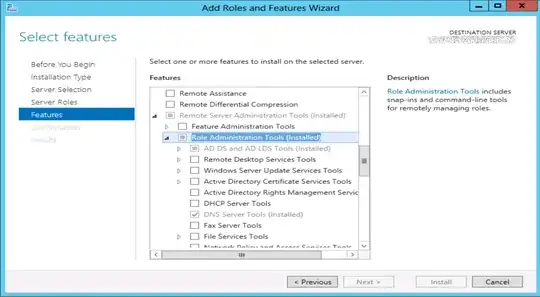
enter image description here

How should I proceed?

HopelessN00b
  • 54,273
LonnieBest
  • 1,640
  • 4
  • 25
  • 41

3 Answers3

4

This is apparently by design. The Hyper-V Management Role is not available on Server 2012 Essentials.

The Hyper-V Management Role is available on Server 2012 Standard, or Windows 8, however.

Given that, my advice would be to either stand up a Server 2012 Standard box and install that role, or a Windows 8 workstation, if licensing costs are a factor. The Windows 8 RSAT download can be found here, and the Windows 8.1 RAST can be found here.

HopelessN00b
  • 54,273
2

I realize this post is a couple months old, but you should update your version of Essentials, Microsoft has bundled in Hyper-V with Essentials, both the service as well as the manager.

http://blogs.technet.com/b/sbs/archive/2013/09/03/understanding-licensing-for-windows-server-2012-r2-essentials-and-the-windows-server-essentials-experience-role.aspx

MDMoore313
  • 5,616
-2

Install a server. No Hyper-V = no admin tools.

TomTom
  • 52,109
  • 7
  • 59
  • 142