2024 update below
Price : There's heaps of CA's and resellers that provide well supported SSL certificates that are even affordable for your Mom's recipe website, let alone for business use. Besides a couple of free ones, as in beer, others are still cheaper then a pint. So no issue there.
Latency is increased by switching to HTTPS : the initial SSL handshake requires two extra roundtrips before the connection is established, compared to just the one roundtrip required to establish a TCP connection to the plain unencrypted HTTP port. So effectively it will take three times as long before the first data is received by your users.
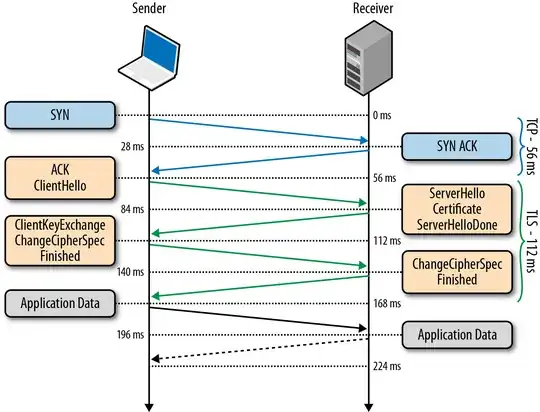
Bandwidth Increase : The used bandwidth will increase slightly as the header size will increase by a number of bytes for protocol reasons and the effective payload will decrease a due to the framing overhead, and some ciphers will use padding as well. Assume a common MTU of 1500 bytes packet size ; the HTTPS protocol overhead will still leave at least 1400 bytes effective payload data size, therefore in max 6-7% increase in bandwidth.
CPU Load : The most computational expensive part is the public key exchange, after which a relatively efficient symmetric cypher is used. Most quotes suggest that modern commodity hardware does not require SSL offload cards to deal with that overhead.
In January this year (2010), Gmail switched to using HTTPS for
everything by default. Previously it had been introduced as an option,
but now all of our users use HTTPS to secure their email between their
browsers and Google, all the time. In order to do this we had to
deploy no additional machines and no special hardware. On our
production frontend machines, SSL/TLS accounts for less than 1% of the
CPU load, less than 10 KB of memory per connection and less than 2% of
network overhead. Many people believe that SSL/TLS takes a lot of CPU
time and we hope the preceding numbers (public for the first time)
will help to dispel that.
If you stop reading now you only need to remember one thing: SSL/TLS
is not computationally expensive any more.
-- Adam Langley (Google)
A good resource is chapter 4 from High Performance Browser Networking by Ilya Grigorik
In conclusion, the overhead except for the latency in establishing a new connection, is negligible.
What is best, it depends on your needs... Using a CDN might become more expensive when you also need SSL support for instance.
2024 - 10 Years later
HTTPS is everywhere and the internet is faster than ever.
Price: In 2016 Let's Encrypt became publicly available and significantly changed the lanscape. Their ACME client certbot (and other implementations) made getting valid and widely accepted certificates completely free of charge and deploying them trivial.
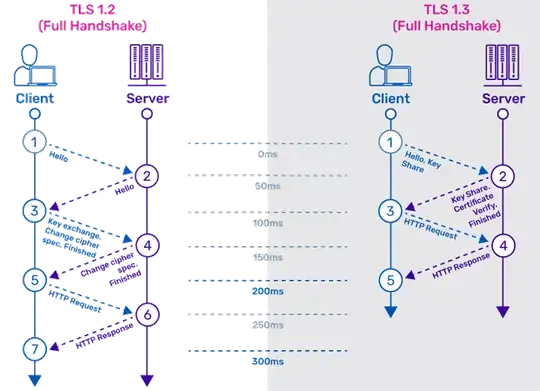
Latency: More or less in parallel protocol improvements led to TLS 1.3 that removed the extra steps from the handshake:
CPU load: And of course all CPU's , not only server CPU's, but also the more lightweight CPU's in appliances, in smart phones, etc. etc. all now have built in support for offloading cryptographic calculations to the silicon.
As a result there are hardly any relevant websites left are not (also) available on HTTPS and most plain HTTP sites only exist to redirect to HTTPS.
Browser can be configured to use HTTPS by default to avoid the latency of first going to the plain HTTP only to be redirect to HTTPS. And there are things like HSTS and even complete TLD's that won't allow plain HTTP anymore for any site because they're on the HSTS preload list and where even when you manually enter HTTP://some.example.dev the browser will immediately go to HTTPS://some.example.dev. See for example: List of top-level domains (TLDs) that require HTTPS connections, like .dev
Rather than showing that a site is "secure" and uses HTTPS and an valid certificate, or the "green bar" when the site uses an extended validation certificate, browser have started to alert users when a site is insecure and not available on HTTPS instead.


