-4

I have a server with 4 modules, and one Ethernet Port and an internal hub to assign these modules to, configured as below.

  • Module 1: 192.168.10.1
  • Module 2: 192.168.10.2
  • Module 3: 192.168.10.3
  • Module 4: 192.168.10.4

Each of these Modules intend to talk to 4 devices, all of which have the same IP address, and cannot be changed. (192.168.10.150)

I then have a PC which controls this server and the devices, and the PC has an IP address of 192.168.10.10. Everything is set statically here, and needs to stay the way it is.

Is there a way I can make this server, with multiple IP addresses, talk to these different devices which share the same IP address?

Nathan C
  • 15,223
eecs
  • 13

4 Answers4

3

Put a cheap box such as Raspberry PI with static NAT in front of each device to translate it to it's own IP.

Now the server is hitting different IPs for each device (server is happy) while each device can happily work away in blissful ignorance that it's being NATted (device is happy).

But seriously, just fix the damn problem in the first place. Ew.

MikeyB
  • 40,079
2

Is there a way I can make the server with multiple IP addresses talk to different devices which have same IP addresses?

If you want all 4 nics on the server to be active and accessing multiple devices that have the same IP...NO.

You could look into something like ForceBindIP: http://old.r1ch.net/stuff/forcebindip/ if you were interested in routing certain apps through certain NICs on the server but having those remote all have the same IP isn't going to work.

The only way I can even conceive such a thing is if you plugged/unplugged ethernet cables all the time. e.g. unplug all but 1 server NIC and then unplug all but 1 remote device. Rinse, and repeat. But your current scenario of 4 server nics <> Hub <> 4 devices...ain't gonna work with dupe IPs if you want it to talk via IP.

TheCleaner
  • 33,047
1

No. No no no. NO.

NO.

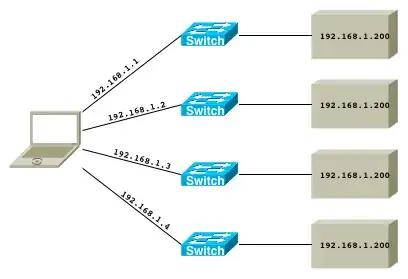
You're describing this situation (switches optional; you could just have cables port-to-port):
enter image description here

In such a configuration your poor computer (played by our hapless laptop) is in an IP-impossible situation: It has three interfaces, all presumably configured to be in the same subnet (192.168.1.0/24 since you're accessing 192.168.1.200 from each of them and that's the only way the subnet math works out).

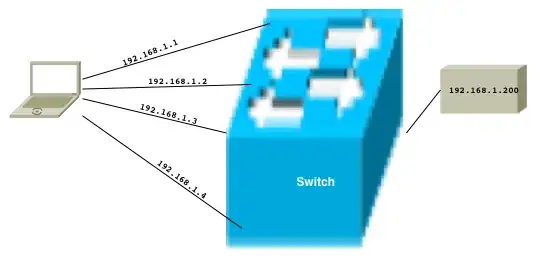
Your computer thinks it's in this situation:

enter image description here

You have four interfaces configured with the same subnet, so your computer logically assumes they are connected to the same network.
You can't have duplicate IP addresses in an IP network (because the IP specification says you can't), so your computer also logically assumes that 192.168.1.200 is a single device (not 4).

So you're left with a very confused computer and a 4-way IP address conflict that will cause havoc on your network.


I'm not sure what exactly what you're trying to do, but you can't do it this way.

voretaq7
  • 80,749
0

Yes, this is easy. Set a static entry in your ARP table on your laptop. Hopefully you are running Linux or FreeBSD on your PC Laptop. :) Read this manual page:

man arp
Rudy
  • 31