We have a staff member who requires access to a single folder in the root of a network share. All other files and folders in the share should be inaccessible to them.
I thought if I added only "Traverse Folder / Execute File" and "Traverse Folder / List Data", it would be enough for the user to browse the root of the share; however, they are denied access to the network share itself with only these permissions and so cannot drill down to the subfolder they need access to.
My goal is to grant only the absolute minimum permissions necessary for folder traversal of the root of the network share.
Ideally, I want any new folders created in the root of this share by other users to automatically restrict access to the user in question (so new folders should not inherit traversal permissions for the user).
Here are the NTFS options I have to choose from:
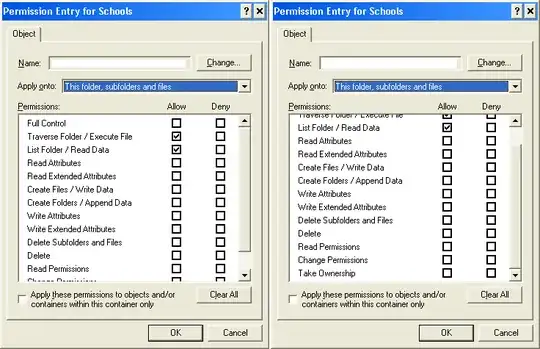
Just to be clear: the reason I am not simply using explicit deny permissions on the other subfolders is because I need any new subfolders created by staff to automatically inherit permissions which prevent the new user from accessing them.
I've never used the traversal permissions before, so am most likely making a basic mistake here.
Any advice would be appreciated.


