39

I am trying to install an MSI on a Windows Server 2012 machine which is part of my lab domain. I am local and domain admin, but I seem to be prevented from installing this MSI.

For clarification, when attempting to install the git extension for visual studio (located here) logged in as a domain user that is part of the administrator group, I get the following error
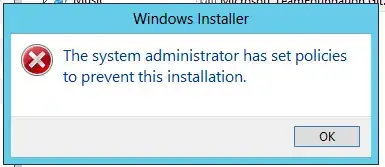
enter image description here

The machine reporting the error is a Windows Server 2012.

I'm almost certain it must be some sort of group policy restriction? None will have been set, unless it's the default security level?

For clarification, I'd like to know what is preventing this MSI being installed by a domain admin?

Daniel
  • 7,137

7 Answers7

45

After spending time looking at group policy, as far as I could tell, there was nothing that was relevant. I then came across this post that suggest I try launching a command promt as an administrator and running

 msiexec /a install.msi

This appeared to work, but ran very quickly - in fact it didn't. On a whim, I tried this inside the admin command prompt.

 msiexec /i install.msi

which worked a treat.

24

I've run into this behavior, where MSI installation is prevented with "The system administrator has set policies to prevent this installation" before. I believe it is due to default Windows Software Restriction policy and I've seen it on both Windows Server 2008 R2 and Windows Server 2012.

There is probably a better GUI based way to alter the policy, but setting the following reg key as an admin on the machine does the trick:

[HKEY_LOCAL_MACHINE\SOFTWARE\Policies\Microsoft\Windows\Installer]
"DisableMSI"=dword:00000000
3

This is usually due to a Group Policy or a Local Policy disabling Windows Installer.

Look on your Domain Controller if you have a GPO disabling "Windows Installer": Computer Configuration > Administrative Templates > Windows Components > Windows Installer > "Turn off Windows Installer".

Verify that it is set to "Not configured" or "Disabled".

If if you don't find it in your GPO's, look on the computer's local policies using gpedit.msc.

Note: the fact that you are a domain admins doesn't matter. It all depends of the scope of the GPO.

1

We had the same exact issue when building an MSI using IsCmdBld.exe, but not when building from the InstallShield software user interface.

When running the installer, we would see the error mentioned by the OP and the installation log would show: MSI_LUA: Invalid Descriptor Format.

The cause of the problem was that we were passing a ProductCode Guid value to the IsCmdBld.exe command line like this: -z "ProductCode"="f176c219-dec0-4fa9-a373-94a711f28a3d".

You can see that the Guid provided here is not surrounded by { and }.

We fixed it by passing the guid with brackets around: -z "ProductCode"="{f176c219-dec0-4fa9-a373-94a711f28a3d}" which works as expected and does not display the error anymore.

KavenG
  • 11
0

right-click -> run as administrator

calorie712
  • 109
  • 1
0

Neither the msiexec nor registry fixes worked for me (even after rebooting), but disabling User Account Control (as suggested by Ha Ly in this thread) and rebooting did the trick.

Miles
  • 201
-2

You have the option to turn off UAC via registry by changing the DWORD EnableLUA from 1 to 0 in HKEY_LOCAL_MACHINE\SOFTWARE\Microsoft\Windows\CurrentVersion\policies\system. You will get a notification that a reboot is required. After the reboot, UAC is disabled.

sebix
  • 4,432