7

Background

After I configured our Active Directory so that the ability to move computers was delegated to helpdesk staff, I started hearing reports that computers would get "stuck" in specific OU's. They can move a computer in, but get an "access denied" message when trying to move a computer out. The problem is 100% reproducible, and is only present on a small number of OU's in our domain.

Both OU's have Protect object from accidental deletion enabled.

What I already know

Inspecting the ACL using ldp.exe does reveal one tiny but important difference. For some reason, only ONE of the OU's has the attribute ACTRL_DS_DELETE_CHILD denied to Everyone.

Toggling the Protect object flag on and off on either OU does not fix the problem. It does modify the ACL as expected, but the ACTRL_DS_DELETE_CHILD flag is completely unmodified in either case.

I can use this solution to "fix" a specific OU:

  1. Turn off Protect object flag
  2. Delete the Deny ACE associated with Everyone.
  3. Turn Protect object back on
  4. Now the ACL's match.

Could it be that different versions of Active Directory, or Remote Server Admin Tools, might have different behaviour with how the Protect object flag is actually represented on an OU?

The Question

What could possibly cause this difference, and what can I do to ensure that it is corrected on all OU's in the Active Directory domain?

Details

The unified diff looks like this:

18c18
<       Ace Mask:  0x00010042
---
>       Ace Mask:  0x00010040
20d19
<           ACTRL_DS_DELETE_CHILD
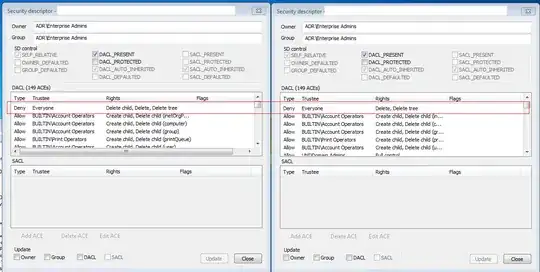
Minor ACE ACL difference prevents moving computer objects

How to identify affected organizational units

EDIT: I wrote a PowerShell script to locate Organizational Units that have this flag set on them.

$Base = "OU=MyOU,DC=your,DC=domain,DC=com"
Import-Module ActiveDirectory
Set-Location AD:
Get-ADOrganizationalUnit -SearchBase $Base -filter * |
    ForEach-Object {
        $matches = @(
            (Get-ACL $_.DistinguishedName).access |
            Where-Object {
                $_.IdentityReference -eq "Everyone"
            } |
            Where-Object {
                $_.ActiveDirectoryRights -like "*DeleteChild*"
            }
        )
        if ($matches.length -gt 0) {
            Write-Output $_
        }
    } |
    Format-Table DistinguishedName
Nic
  • 13,695

2 Answers2

4

Explanation

When you enable the Protect object from accidental deletion flag on an organizational unit, it affects the ACL of that object and its parent.

  1. The protected OU gets {Deny, Everyone, Delete+DeleteSubtree}
  2. The parent OU gets {Deny, Everyone, DeleteChildObjects}

The access control entry on the parent is necessary for enforcing protection, but does have unexpected results like that observed here. And no matter how many times you toggle the protect flag, the Deny access control entry on the parent will never be automatically removed.

Thus in the Active Directory that I was working with, any OU which had ever contained a protected OU (basically any non-leaf OU) had the Deny DeleteChild ACE on it, thus "trapping" computer objects in that OU from the perspective of users with delegated permissions.

Via: Protect object from accidental deletion on Technet Forums

Solution

This can easily be resolved by ensuring that the base OU used to delegate permissions has these two access control entries in the ACL.

  1. {Allow, GROUP, Create/delete computer objects, this object and all descendents}*
  2. {Allow, GROUP, Delete+DeleteSubtree, Descendent computer objects}

I had already configured the first access control entry on the relevant OU in my directory, but now I know that was insufficient. The first rule gets cancelled out by the automatic deny ACE set up whenever a protected OU is created. The second rule allows an object to be deleted directly, thus bypassing the deny entry set up when a child OU is protected.

*(It's possible that the first rule is now redundant. Can anyone confirm?)

Nic
  • 13,695
1

Following is the least amount of privileges required for moving a computer object between two OUs. This must be set (either inherited or directly) on both the source and destination OU to allow moving back and forth between the OUs. If only one direction should be allowed, set the first three permissions on the source OU and the last permission on the destination OU

Allow   Descendant Computer objects              Write name
Allow   Descendant Computer objects              Write Name
Allow   Descendant Computer objects              Delete
Allow   This object and all descendant objects   Create Computer objects

Notes:

  • The Delete permission (third row) must be set on Descendant Computer objects to overwrite the accidental deletion prevention that might be set on children of the OU where you want to move the computer out of. Setting Delete Computer objects permission on This object and all descendant objects instead does not work when accidental deletion prevention is enabled on the OU
  • There exist two name permissions, one lowercase and one uppercase, both must be set
  • The permission Write Distinguished Name as described in this document is not required