4

I've implemented SCCM on our server and am now running task sequences to migrate from Windows XP to Win7.
But we also need to be able to add a new local admin, because disable the default Administrator (with the built-in step).

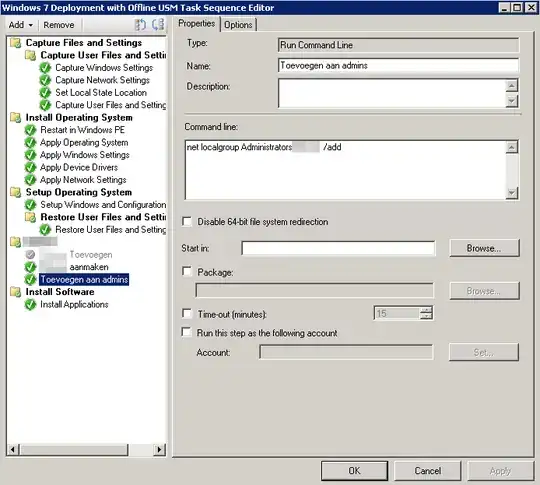
To add the new admin, I created a new group with two command line steps (each line below is a seperate step).

net user LocalAdminUsername LocalAdminPassword /passwordchg:no /expires:never /add
net localgroup Administrators LocalAdminUsername /add

In my test environment this worked perfectly.
I added the group behind Apply Windows Settings and it would run perfectly.
But for some reason it now longer does ...
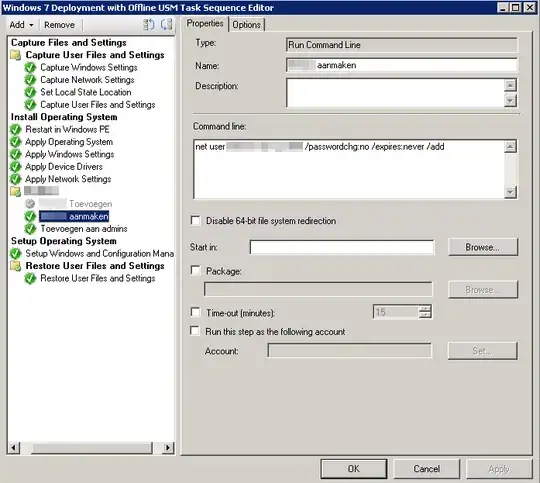
Task Sequence

Any ideas?

EDIT:
Can someone explain what is needed to be able to perform this action?
Is there some sort of remote execution policy needed, a firewall rules that needs to be opened, ... ?

Thanks in advance!

PS: As a sidenote, I also need some help setting the keyboard layout to nl-be (Belgium Period). I'm using an unattend.xml with these settings, but it doesn't seem to apply them.

BlueCacti
  • 197

2 Answers2

4

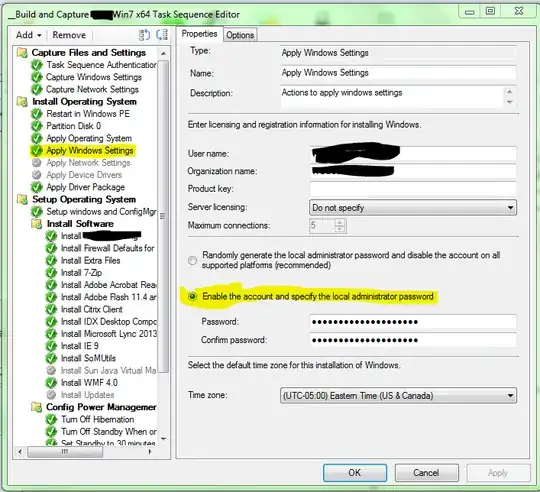
For reference the local admin account can be enabled during the TS as well, see the screenshot below:

Task Sequence

Now, for your command: I suspect that the command can only be run under the Full OS (as opposed to WinPE. I noticed in your screenshot you don't restart into the Full OS at all. Any SCCM packages (this includes command line commands that act on the Full OS) will have to be installed after the SCCM client, and after the client is installed it will boot into the Full OS and continue the task sequence. This would of course be confirmed by your smsts.log file at the point of failure, but I'm fairly certain that's at least part of the problem.

What it appears you're doing now is adding the account to WinPE, and not to Windows. Bringing up an F8 Prompt during a TS and typing net user walkie /add for me gives the following:

The user or group account specified cannot be found.

The user was successfully created but could not be added to the USERS local group.

More help is available by typing NET HELPMSG 3774.

Now, that account was created, but I'm betting the command didn't return a 0 exit code, which is what SCCM thrives on (among another one that escapes me at the moment, which means success but reboot required). Any others not explicitly defined as success on the options tab of that step will error and cause the task sequence to stop, unless you define that step or group to continue on error.

MDMoore313
  • 5,616
2

So I've had the chance to deliberate this issue with a collegue of mine.
We both came to the same conclusion as the answer of @BigHomie.
The user couldn't be added as all steps in the Install Operating System group are executed in WinPE.

I thought it would work, because you can enable/disable the default admin, but apparently that is done by some hook in the setup.

We moved the creation of the user to the end of the TS, after setting up the SCCM client and after restoring the user data.

Task Sequence

Thank you all for your help. I really appreciate how fast you reacted, even though StackOverflow was down this morning.

PS: I also got the keyboard working. SCCM is finally taking my Unattend.xml :)

BlueCacti
  • 197