3

Is there a way to see folder/file permissions in a collapsable tree view in Windows?

What I think I need is something like:

+ folder1 - EntAdmins[RWX],JoeBloggs[R--],Administrators[RWX]]
+ folder2 - EntAdmins[RWX],JoeBloggs[RWX],JoesWife[R--]Administrators[RWX]]

And so on for lots of folders.

Ideally the tool would do something like below; when the "+" is clicked:

- folder1
|---+ Subfolder1 - EntAdmins[RWX],JoeBloggs[R--],Administrators[RWX]]
|---+ Subfolder2 - EntAdmins[RWX],JoeBloggs[R--],Administrators[RWX]]
|
+ folder2 - EntAdmins[RWX],JoeBloggs[RWX],JoesWife[R--]Administrators[RWX]]

Does something like this exist for Windows? I need to scan hundreds of folders for their permissions and would prefer not to do the right click and "Properties | Security | Advanced" just to see the permissions.

3 Answers3

6

AccessEnum from Microsoft Sysinternals does most of what you requested. It does not however have the facility to drill down, but it's a very useful tool nonetheless.

Give it a try!

AccessEnum Screenshot
(source: microsoft.com)

Glorfindel
  • 1,213
Izzy
  • 8,253
3

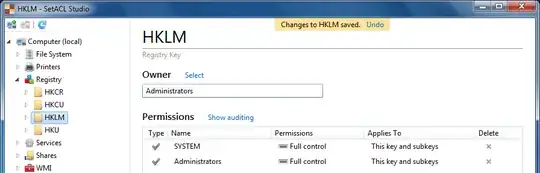
My tool SetACL Studio does exactly what you want. It has a tree view on the left and displays owner and permissions in the main area on the right:

enter image description here

As you can see, it even works with different object types: file system, registry, printers, services, shares, and WMI objects. You can change permissions, too, of course. And it has undo.

Helge Klein
  • 2,111
2

You may be able to do something similar to what you're talking about in Windows Powershell using the following command line:

dir -recurse | where { $_.PSIsContainer -eq "TRUE" } | get-acl

Optionally, you could pipe the output to a file like this:

dir -recurse | where { $_.PSIsContainer -eq "TRUE" } | get-acl | out-file "C:\report.txt"
Hiten004
  • 103
Marcus
  • 536