I am setting up a standard LEMP stack. My current setup is giving me the following error:
502 Bad Gateway
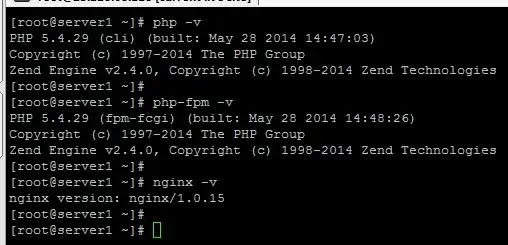
This is what is currently installed on my server:
Here's the configurations I've created/updated so far, can some one take a look at the following and see where the error might be? I've already checked my logs, there's nothing in there (https://i.sstatic.net/NCpWG.png). And I saw the following in /var/log/php-fpm/error.log file.
sidenote: both the nginx and php-fpm has been configured to run under a local account called www-data and the following folders exits on the server

nginx.conf global nginx configuration
user                    www-data;
worker_processes        6;
worker_rlimit_nofile    100000;
error_log               /var/log/nginx/error.log crit;
pid                     /var/run/nginx.pid;
events {
    worker_connections 2048;
    use epoll;
    multi_accept on;
}
http {
    include       /etc/nginx/mime.types;
    default_type  application/octet-stream;
# cache informations about FDs, frequently accessed files can boost performance
open_file_cache max=200000 inactive=20s;
open_file_cache_valid 30s;
open_file_cache_min_uses 2;
open_file_cache_errors on;

# to boost IO on HDD we can disable access logs
access_log off;

# copies data between one FD and other from within the kernel
# faster then read() + write()
sendfile on;

# send headers in one peace, its better then sending them one by one
tcp_nopush on;

# don't buffer data sent, good for small data bursts in real time
tcp_nodelay on;

# server will close connection after this time
keepalive_timeout 60;

# number of requests client can make over keep-alive -- for testing
keepalive_requests 100000;

# allow the server to close connection on non responding client, this will free up memory
reset_timedout_connection on;

# request timed out -- default 60
client_body_timeout 60;

# if client stop responding, free up memory -- default 60
send_timeout 60;

# reduce the data that needs to be sent over network
gzip on;
gzip_min_length 10240;
gzip_proxied expired no-cache no-store private auth;
gzip_types text/plain text/css text/xml text/javascript application/x-javascript application/xml;
gzip_disable "MSIE [1-6]\.";

# Load vHosts
include /etc/nginx/conf.d/*.conf;

}
conf.d/www.domain.com.conf my vhost entry
## Nginx php-fpm Upstream
upstream wwwdomaincom {
    server unix:/var/run/php-fcgi-www-data.sock;
}
Global Config
client_max_body_size            10M;
server_names_hash_bucket_size   64;
Web Server Config
server
{
    ## Server Info
    listen 80;
    server_name domain.com *.domain.com;
    root /home/www-data/public_html;
    index index.html index.php;
## Error log
error_log /home/www-data/logs/nginx-errors.log;

## DocumentRoot setup
location / {
    try_files $uri $uri/ @handler;
    expires 30d;
}

## These locations would be hidden by .htaccess normally
#location /app/                       { deny all; }

## Disable .htaccess and other hidden files
location  /. {
    return 404;
}

## Magento uses a common front handler
location @handler {
    rewrite / /index.php;
}

## Forward paths like /js/index.php/x.js to relevant handler
location ~ .php/ {
    rewrite ^(.*.php)/ $1 last;
}

## Execute PHP scripts
location ~ \.php$ {
    try_files $uri =404;
    expires        off;
    fastcgi_read_timeout 900;
    fastcgi_pass   wwwdomaincom;
    fastcgi_param  SCRIPT_FILENAME  $document_root$fastcgi_script_name;
    include        fastcgi_params;
}

## GZip Compression
gzip on;
gzip_comp_level 8;
gzip_min_length 1000;
gzip_proxied any;
gzip_types text/plain application/xml text/css text/js application/x-javascript;

}
/etc/php-fpm.d/www-data.conf my php-fpm pool config
## Nginx php-fpm Upstream
upstream wwwdomaincom {
    server unix:/var/run/php-fcgi-www-data.sock;
}
Global Config
client_max_body_size            10M;
server_names_hash_bucket_size   64;
Web Server Config
server
{
    ## Server Info
    listen 80;
    server_name domain.com *.domain.com;
    root /home/www-data/public_html;
    index index.html index.php;
## Error log
error_log /home/www-data/logs/nginx-errors.log;

## DocumentRoot setup
location / {
    try_files $uri $uri/ @handler;
    expires 30d;
}

## These locations would be hidden by .htaccess normally
#location /app/                       { deny all; }

## Disable .htaccess and other hidden files
location  /. {
    return 404;
}

## Magento uses a common front handler
location @handler {
    rewrite / /index.php;
}

## Forward paths like /js/index.php/x.js to relevant handler
location ~ .php/ {
    rewrite ^(.*.php)/ $1 last;
}

## Execute PHP scripts
location ~ \.php$ {
    try_files $uri =404;
    expires        off;
    fastcgi_read_timeout 900;
    fastcgi_pass   wwwdomaincom;
    fastcgi_param  SCRIPT_FILENAME  $document_root$fastcgi_script_name;
    include        fastcgi_params;
}

## GZip Compression
gzip on;
gzip_comp_level 8;
gzip_min_length 1000;
gzip_proxied any;
gzip_types text/plain application/xml text/css text/js application/x-javascript;

}
I've got a file in /home/www-data/public_html/index.php with the code <?php phpinfo(); ?> (file uploaded as user www-data).


