8

I am trying to print out information from the Task Scheduler from the local computer in a PowerShell script so other users can print out this information as well and not have to access the Task Scheduler. I need the script to print out

  • name,
  • status,
  • triggers,
  • next run time,
  • last run time,
  • last run result,
  • author,
  • created.

I can print out the information about the name, next run time, and last run time, but the rest won't print out when I run the script.

I have already got a little start on my script and got the fields down.

$schedule = new-object -com("Schedule.Service") 
$schedule.connect() 
$tasks = $schedule.getfolder("\").gettasks(0)

$tasks | select Name,Status,Triggers,NextRunTime,LastRunTime,LastRunResult,Author,Created | ft

foreach ($t in $tasks)
{
foreach ($a in $t.Actions)
{
$a.Path
}
}

Any help or suggestions would be appreciated.

Below is a screenshot with what i am looking for and what fields arent printing out data:
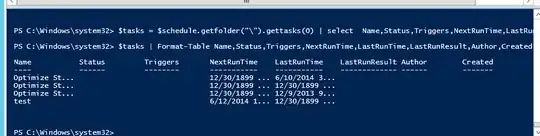
Below is a screenshot with what i am looking for and what fields arent printing out data:

user38725
  • 379
  • 3
  • 5
  • 14

2 Answers2

5

Server 2012 R2 and Windows 8.1 have Task Scheduler cmdlets, and this module can be copied and used on a Windows 7 machine, presumably it probably needs the latest .NET and the Windows Management Framework as well. I'm able to disable and re-enable scheduled tasks, as well as display task information. Currently I don't know of built-in cmdlets that give me this information or allow this control.

To list all the scheduled tasks on the machine:

Get-ScheduledTask

You can get the following members from the task sequence object:

PS C:\BigHomie> $A = Get-ScheduledTask | select -First 1

PS C:\BigHomie> $A

       TypeName: Microsoft.Management.Infrastructure.CimInstance#Root/Microsoft/Windows/TaskScheduler/MSFT_ScheduledTask

Name                      MemberType     Definition
----                      ----------     ----------
Clone                     Method         System.Object ICloneable.Clone()
Dispose                   Method         void Dispose(), void IDisposable.Dispose()
Equals                    Method         bool Equals(System.Object obj)
GetCimSessionComputerName Method         string GetCimSessionComputerName()
GetCimSessionInstanceId   Method         guid GetCimSessionInstanceId()
GetHashCode               Method         int GetHashCode()
GetObjectData             Method         void GetObjectData(System.Runtime.Serialization.SerializationInfo info, Sys...
GetType                   Method         type GetType()
ToString                  Method         string ToString()
Actions                   Property       CimInstance#InstanceArray Actions {get;set;}
Author                    Property       string Author {get;set;}
Date                      Property       string Date {get;set;}
Description               Property       string Description {get;set;}
Documentation             Property       string Documentation {get;set;}
Principal                 Property       CimInstance#Instance Principal {get;set;}
PSComputerName            Property       string PSComputerName {get;}
SecurityDescriptor        Property       string SecurityDescriptor {get;set;}
Settings                  Property       CimInstance#Instance Settings {get;set;}
Source                    Property       string Source {get;set;}
TaskName                  Property       string TaskName {get;}
TaskPath                  Property       string TaskPath {get;}
Triggers                  Property       CimInstance#InstanceArray Triggers {get;set;}
URI                       Property       string URI {get;}
Version                   Property       string Version {get;set;}
State                     ScriptProperty System.Object State {get=[Microsoft.PowerShell.Cmdletization.GeneratedTypes...


PS C:\BigHomie> $A.Triggers


Enabled            : True
EndBoundary        :
ExecutionTimeLimit :
Id                 :
Repetition         : MSFT_TaskRepetitionPattern
StartBoundary      :
PSComputerName     :
MDMoore313
  • 5,616
5

This could be cleaned up a bit (i.e. mapping LastRunResult codes). Let me know if you need help. Triggers are a bit more difficult since I don't think the plain English representation you see when viewing a task in the GUI exists in the COM object. I believe it would have to be built from the TriggerCollection stored in RegisteredTask.Definition.Triggers

$sched = New-Object -Com "Schedule.Service"
$sched.Connect()
$out = @()
$sched.GetFolder("\").GetTasks(0) | % {
    $xml = [xml]$_.xml
    $out += New-Object psobject -Property @{
        "Name" = $_.Name
        "Status" = switch($_.State) {0 {"Unknown"} 1 {"Disabled"} 2 {"Queued"} 3 {"Ready"} 4 {"Running"}}
        "NextRunTime" = $_.NextRunTime
        "LastRunTime" = $_.LastRunTime
        "LastRunResult" = $_.LastTaskResult
        "Author" = $xml.Task.Principals.Principal.UserId
        "Created" = $xml.Task.RegistrationInfo.Date
    }
}

$out | fl Name,Status,NextRuNTime,LastRunTime,LastRunResult,Author,Created
pk.
  • 6,541