8

I regularly do things where I loop through a list of servers to take some action. For example:

for s in `cat servers.txt` ; do
    echo; echo $s
    ssh $s 'do something'
done

I'm wondering (from a shell perspective) if there's an easier way of doing this than cat servers.txt

Yes I know about tools like mcollective, capistrano, etc - I'm often doing this to fix up mcollective problems :-)

ewwhite
  • 201,205
Sonia Hamilton
  • 351
  • 1
  • 4
  • 12

8 Answers8

7

I use ClusterSSH.
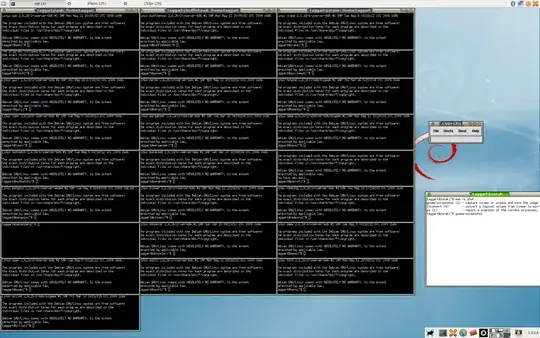
It opens up a lot of small shells, and you can type to all of them in the same time. Really handy when you want to execute the same command on a lot of servers, but still see the output.
I use it like this: clusterssh $(~/get-servers.sh), but obviously you can do something like clusterssh $(cat servers.txt)
The result looks like this:

enter image description here

It's also available as a Debian package.

Nitz
  • 1,078
6

My quick and dirty... where servers.txt has a series of hosts or IPs, one-per-line.

#!/bin/bash

SERVER_LIST=/path/to/servers.txt

while read REMOTE_SERVER
do
        ssh $REMOTE_SERVER "do_something_cool"
done < $SERVER_LIST
ewwhite
  • 201,205
5

Please do yourself a favor and use something designed for this. You already know about mcollective, but you and I both know that it needs some infrastructure to work. As do puppet and chef.

clusterssh, parallel ssh and dancer shell are small simple improvements over a shell for loop. They don't need more infrastructure.

But there's also ansible, which let's you do that, but also write reusable "playbooks" with several steps. It does need python installed in addition to sshd, but in practice I've never had to separately install that, it's always been available.

Ansible is the only configuration management system I've tried that also works well as a deployment and orchestration tool (puppet needs mcollective and maybe capistrano/fabric for that, ...)

(Yes, Puppet and Chef and all the rest can be run without central servers, but you need to install packages on the hosts to manage, which ansible doesn't need)

ptman
  • 29,862
4

Here is how to use xargs to parallelize these ssh sessions:

cat servers.txt | xargs -IH -n1 -P0 ssh H 'some command to run'

You can also add the -n or -f options to ssh to redirect the stdin from /dev/null or put the session in the background. If you have to type a password for each host, then this doesn't help you much, but if you are using ssh keys then this works very nicely.

4

To execute a simple task across a wide range of servers without using any tool designed for this purpose, regardless they require previous infrastructure or not, you can use a simple shell script called mussh, distributed as a package in many distributions.

You can call it with a list of hosts, a list of commands, store both things in files, and quite a few more options, like ssh-agent integration, proxy support, ... Check the manpage for all the details.

An example could be as simple as:

$ mussh -H host_list.txt -C command_list.txt
dawud
  • 15,504
2

Have you considered using parallel-ssh? https://code.google.com/p/parallel-ssh/

I generally fall back to using that if/when our mco or puppet setup is broken. It is another dependency to manage, but totally worth it if you have large fleet of boxen to manage - with the added bonus of being able to choose how many machines to work on in tandem/parallel, or even doing one at a time, as you're used to with bash.

Andrew
  • 504
0

Undeleted my answer. Although it's not really clear what you're asking for.


There is a project called parallel SSH which provides parallel versions of ssh, scp and rsync.

So the advantage is that you don't need to do any shell script you just provide it the list of servers to run the command on and it'll do it in parallel.

This is great if you've got a long running set of ssh commands to do as it will do them all in parallel offering a potentially big speed up.

e.g.

parallel-ssh -h myhosts.txt "echo 'hello world'"
hookenz
  • 14,848
-1

copied from Sarav AK at middlewareinventory and modified below

#!/bin/bash
# Script to connect to a list of servers with same username and password 
# and get hostname, uptime and query installed OS version
# you would need the username and password for the remote hosts
# this requires sshpass to be installed on local machine
echo "Enter the Remote username"
read rmtuname

echo "Enter the Remote password" read -s rmtpasswrd

read IP addresses from a predefined host list

for server in cat /full/path/to/serverlist.txt do # Printing the remote hostlist echo "Processing Host "$server

    # Write a local shell script for temporary usage and save in current location
    cat &lt;&lt; 'EOF' &gt; ./TestScript.sh
            #!/bin/bash
            echo &quot;Running in $0&quot;
            echo &quot;on Hostname = `hostname` and &quot; 
            echo &quot;at TimeStamp = `date` for Uptime of `uptime`&quot;
            echo &quot;for RedHat version `cat /etc/redhat-release`&quot;
            echo &quot;for Debian base `lsb_release -a`&quot;
            exit 0

EOF chmod a+x TestScript.sh

    # SCP - copy the script file from current location to remote server tmp location 
    sshpass -p$rmtpasswrd scp -o UserKnownHostsFile=/dev/null -o StrictHostKeyChecking=no TestScript.sh $rmtuname@$server:/tmp/TestScript.sh

    # Take Rest for 3 Seconds
    sleep 3

    # SSH to remote Server  and Execute a Command [ Invoke the Script ] 
    sshpass -p$rmtpasswrd ssh   -o UserKnownHostsFile=/dev/null -o StrictHostKeyChecking=no $rmtuname@$server &quot;/tmp/TestScript.sh&quot;

done

... a snippet of the result/return from the ubuntu host looks like this

...... 
Processing Host 10.0.0.99
Warning: Permanently added '10.0.0.99' (ED25519) to the list of known hosts.
Running in /tmp/TestScript.sh
on Hostname = UBUNTU-HOST1 and 
at TimeStamp = Sat 25 Mar 14:47:57 UTC 2023 for Uptime of  14:47:57 up 15 days, 18:56,  1 user,  load average: 0.28, 0.19, 0.18
cat: /etc/redhat-release: No such file or directory
for RedHat version 
No LSB modules are available.
for Debian base Distributor ID: Ubuntu
Description:    Ubuntu 22.04.1 LTS
Release:    22.04
Codename:   jammy
Processing Host 10.0.0.110
......