1

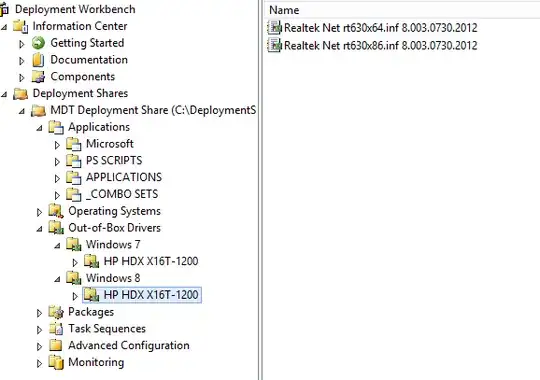
Laptop: HP HDX X16T-1200 CTO Drivers: Taken from the HP Site and extracted.

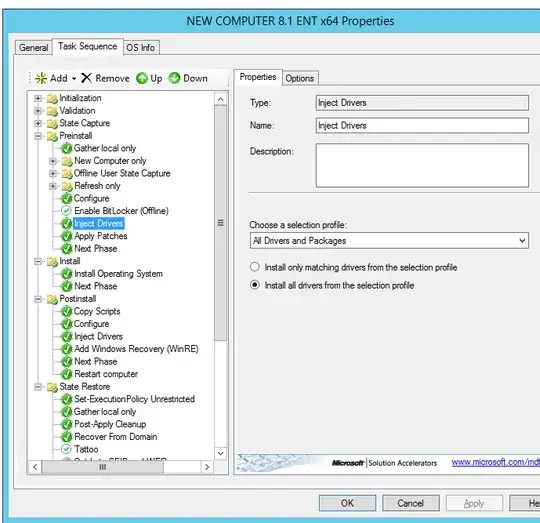
Imported in to MDT 2013. When I launch the Lite Touch it pops up an image saying it can not find the ImageDeploymentShare via DHCP so it looks like even with the network drivers injected I still get nothing.

ipconfig /all shows nothing.

Is this a driver or PE issue? I did research and I know this system works with Windows 8 and the drivers. But for some reason the network does not seem to work from PE.

EDIT: I have now found other drivers recently for Windows 8. I still can not get MDT to get past the DHCP issue. IPConfig still shows no network settings.
enter image description here enter image description here enter image description here

HopelessN00b
  • 54,273
Jason
  • 3,961
  • 20
  • 70
  • 109

2 Answers2

6

Are you using Windows Deployment Services (WDS) to boot via PXE?

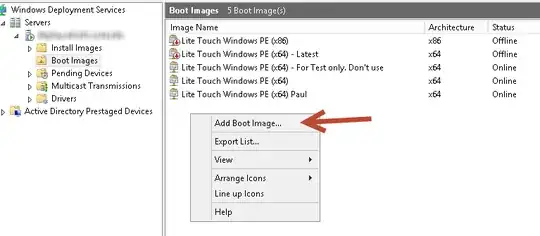
Assuming you are, when you "imported in to MDT", did you also update the deployment share and add the updated WinPE boot image (x86 or x64, or both) to WDS?

The boot images are located in "\NAME\DeploymentShare$\Boot". Add them using the WDS MMC (below).

Add Boot Image in WDS mmc

The screenshot also shows multiple versions of boot images taken from deployment shares after they were added to WDS.

Sounds like you are deploying Windows 8, so this doesn't matter, but for others who may come along, MDT 2013 uses WinPE 5.0 so you need to inject Windows 8 drivers into the WinPE boot images even if deploying Windows 7.

references: http://www.deploymentresearch.com/Research/tabid/62/EntryId/112/MDT-2013-Lite-Touch-Driver-Management.aspx

Related Serverfault question - see part 2 of the question/answer

iPaulo
  • 427
0

First: Injecting the drivers is not for Windows PE. Driver injection is for OS Deployment so that the host OS (the one that is being installed) will have use of its hardware.

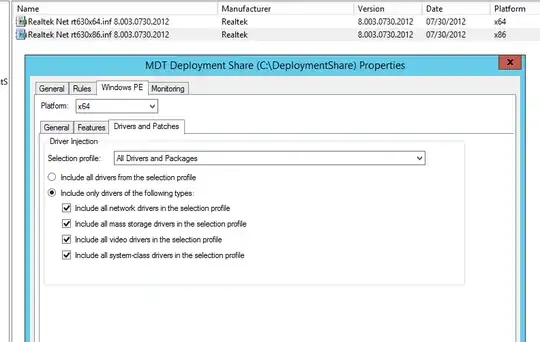
Second: Driver injection works if you have a network connection (which you don't from what you have posted.


Here is what I do (which should help): I downloaded all related (W7 x86 for me) Driver Packs from driverpacks.net and added them into their own categories E.G. Audio, Chipset, WLAN etc...

I then made a special selection profile for my networking drivers and had the Deployment Share PE build properties point to it.

I rebuilt the images and it worked for me!

I use WDS. To get the boot images I navigate to the deployment share's boot folder and use the wim images in there for WDS. I do not extract the ISOs (from what I read they have extra files for standalone operations.)

Hope this helps :)