2

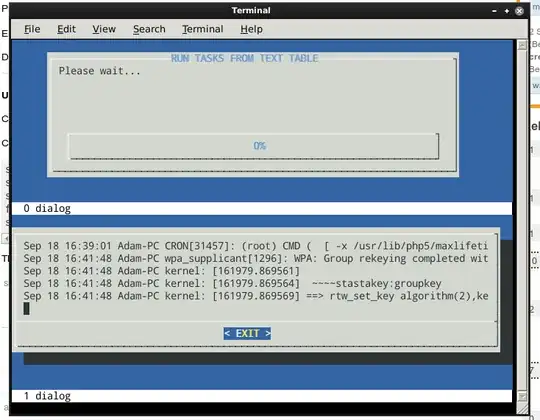
I want to view on the Linux console two dialog windows on the same time.

I want a window that views the progress BAR, and the a second tailbox that view the logs are running.

The problem is that the dialog appears always in the center of the console.

What I want is

  1. to view the two dialog boxes on the same time on the console,
  2. while the progress bar is on the top of the screen,
  3. and the the box should present down in the screen.

How to implement this?

How to place the dialog window up or down and not in the central?

    dialog --title "RUN TASKS FROM TEXT TABLE" --gauge "Please wait..." 10 70 0
    dialog --tailbox file.log 10 100

1 Answers1

3

You can use screen program.

enter image description here

Executing screen manually

After installing screen, execute it by typing screen in your console.

Split your screen by pressing ctrla then S (uppercase S, with shift

Enter your first command

After having the fist command executed, press ctrla then tab to switch to the another window.

Press ctrla then c

Enter the second command.

Done.


Using a script

Create a new directory where you would want to put the script, ie. ~/test/

Create a .screenrc file with the following content:

startup_message off
screen dialog --title "RUN TASKS FROM TEXT TABLE" --gauge "Please wait..." 10 70 0
split
focus down
screen dialog --tailbox /var/log/syslog 10 100

Then just enter screen command to execute the script.

kazy
  • 271