I have a Hyper-V server running on WS2012. I have a Windows 7 running as a dynamic disk. I delete files and more from within to attempt to save disk space and reduce the size. However, the size does not shrink even after I turn it off and run a shrink on the VHD.
Do I need to do something else that will allow me to shrink the VHD so that I can keep the VM from crashing due to a lack of disk space?
EDIT:
I also mounted the disk and ran DEFRAG: E: /V /X to defrag the disk in hopes that I could compact the .VHD but the size still remains over 30GBs over the actual used space inside the drive.
Do I need to 0 out the empty space for a VHD before running the shrink option from Hyper-V?
Running out of disk space:

VHD:

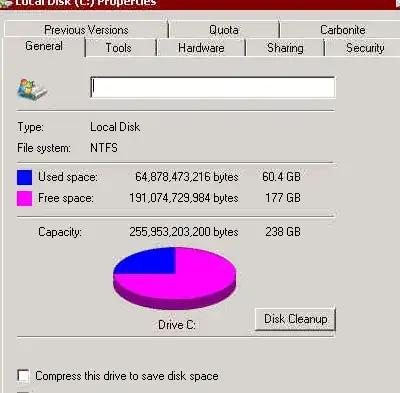
Disk inside the VHD:
PS C:\Users\Administrator> get-vhd

cmdlet Get-VHD at command pipeline position 1
Supply values for the following parameters:
Path[0]: X:\NAME.VHD
Path[1]:


ComputerName            : NAME
Path                    : X:\NAME.VHD
VhdFormat               : VHD
VhdType                 : Dynamic
FileSize                : 86707423744
Size                    : 256060514304
MinimumSize             : 256059113472
LogicalSectorSize       : 512
PhysicalSectorSize      : 512
BlockSize               : 2097152
ParentPath              :
FragmentationPercentage : 16
Alignment               : 0
Attached                : False
DiskNumber              :
IsDeleted               : False
Number                  :
