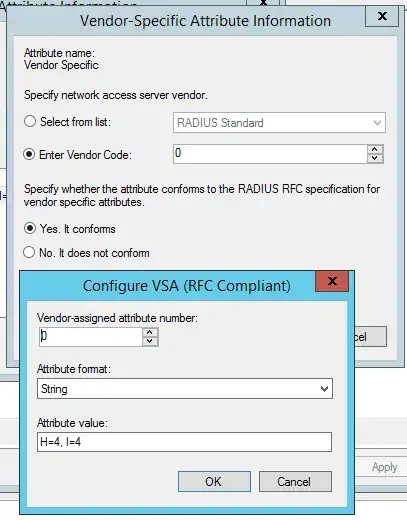
Even with vendor ID 0 I doubt it'd work, as it's going to stick 0x00000000 in front of the string value... unless that "It does not conform" option allows you to specify a raw value for attribute 26.
Supermicro have used a non-standard, non-rfc-compliant encoding scheme for their authorization attribute.
If you look at the format of Vendor-Specific
    0                   1                   2                   3
    0 1 2 3 4 5 6 7 8 9 0 1 2 3 4 5 6 7 8 9 0 1 2 3 4 5 6 7 8 9 0 1
   +-+-+-+-+-+-+-+-+-+-+-+-+-+-+-+-+-+-+-+-+-+-+-+-+-+-+-+-+-+-+-+-+
   |     Type      |  Length       |            Vendor-Id
   +-+-+-+-+-+-+-+-+-+-+-+-+-+-+-+-+-+-+-+-+-+-+-+-+-+-+-+-+-+-+-+-+
        Vendor-Id (cont)           |  String...
   +-+-+-+-+-+-+-+-+-+-+-+-+-+-+-+-+-+-+-+-+-+-+-+-+-
There's meant to be a 32bit PEN at the start of the attribute. But they've just inserted a string value there.
The only way you could get this working (If the "It does not conform" option doesn't help) would to be use another RADIUS server as a gateway, translating an RFC attribute like Service-Type to the malformed Supermicro attribute.
FreeRADIUS and radiator could likely be configured to do this.
FreeRADIUS >= 3.0.0 has explicit provisions for dealing with malformed attributes. They get marked up as unknown octet types when received from an external server, so they can be passed through when proxying.
You can also create them in the configuration using the attribute OID syntax (Attr-<TLV/OID string>).
In this case you want Attr-26 for a raw vendor type VSA. You then need one of a few magic string values:
- Callback "H=1, I=1" -
Attr-26 = 0x483D312C20493D31
- User "H=2, I=2" -
Attr-26 = 0x483D322C20493D32
- Operator "H=3, I=3" -
Attr-26 = 0x483D332C20493D33
- Administrator "H=4, I=4" -
Attr-26 = 0x483D342C20493D34