5

Microsoft has a knowledge base article, last reviewed in June 2007, which states:

If you update environment variables or add new environment variables, you must restart the computer before the changes that you make affect services that run under the Local System account.

It's unclear to me whether this holds true for Windows Server 2008 R2. Can anyone advise?

I notice there is a hotfix for Windows 2003 that solves this problem. Consequently I wonder if 2008 R2 has rolled in this fix. I can't find any evidence to suggest there is still a problem with Windows 2008 R2, but a lack of evidence is less comforting than a concrete statement to the contrary.

A related question covers similar ground, but doesn't discuss Windows 2008.

4 Answers4

8

Restarting a service will pickup changes to system environment variables.

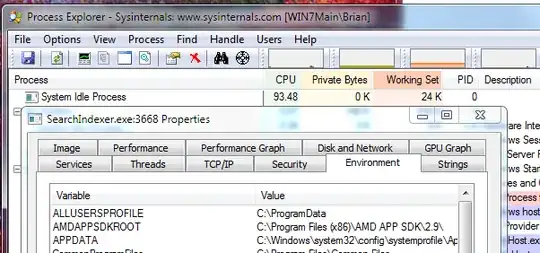
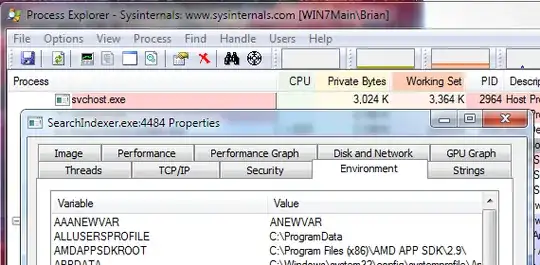
To check: Use SysInternals Process Explorer to inspect the environment of a service process before and after changing/adding a System environment variable and restarting the service. Note: Use "Run as administrator" on procexp.exe to see all properties of system processes.

enter image description here

enter image description here

Brian
  • 3,558
1

Sure. Any process sees the environment variables AS THEY ARE WHEN THE PROCESS STARTS. It basically gets a copy.

So, if you need them to be picked up by services - restart the services. If you need them to be picked up by windows, restart windows.

Especially because the local system account is keeping this copy around ;) So - no. This still holds true. I would generally say that changing this is a "near zero priority" item as this kind of change is quite rare.

TomTom
  • 52,109
  • 7
  • 59
  • 142
1

@Brian answer does not cover all use cases. In my case, I've upgraded Java on Windows 7 x64 machine from version 7 to 8. After that, the service which depends on Java failed to start ("net start SymmetricDS") because the system could not find Java executable.

I.e. services.exe (parent process of all LocalSystem services) does not pick up environment variables' changes itself. It just does so for new spawned child processes. I've confirmed it by looking at it with SysInternals Process Explorer. Proof: http://workblog.pilin.name/2013/03/service-environment-variables.html. It doesn't say which versions of Windows does it apply to, but the date of publication is rather new, so I think it applies to Windows 7 and Windows Server 2008.

Solved the problem by making symlinks to Java executables in one of folders in old PATH contained in services.exe.

0

Possible via nasty hack while running. Otherwise only by restart.

Just verified that environment variables can be changed with Cygwin GDB. Tried with x86 Cygwin and x86 Winword. Verified with ProcExp.exe.

GDB commands found here: https://stackoverflow.com/questions/205064/is-there-a-way-to-change-another-processs-environment-variables

Microsoft says this isn't the regular way of doing this: http://msdn.microsoft.com/en-us/library/windows/desktop/ms682009(v=vs.85).aspx

Altering the environment variables of a child process during process creation is the only way one process can directly change the environment variables of another process. A process can never directly change the environment variables of another process that is not a child of that process.


My earlier edit:

My best guess: Service needs to be restarted. At least.

A process will upon creation inherit the enviroment variables from its parent. (http://msdn.microsoft.com/en-us/library/windows/desktop/ms682653(v=vs.85).aspx)

So: The process must be restarted AND there must be something for it to inherit.

How to check
Check for yourself using ProcExp.exe. (http://technet.microsoft.com/en-us/sysinternals/bb896653.aspx ) Double-click the process you're interested in and then select the "Environment" tab.

To find the parent double-click the child, select the "Image" tab and read the "Parent:" row.

Repeat all the way up the heritage line.