2

I setup MS DirectAccess nearly a year ago, which required configuring computer certificate auto-enrollment. The first computer certificate is going to expire in about a month, and now I'm wondering how that's going to work for machines that are never locally connected to the domain.

The auto-enrollment policy includes automatic renewal. So my question is, when does the renewal take place? If a certificate expires, then it seems to me that the DA connection will stop working, and the renewal won't be able to take place.

I apologize, my knowledge of certificates on Windows (or anywhere) is extremely limited. Thanks

Jim B
  • 24,276
Boden
  • 5,028

3 Answers3

3

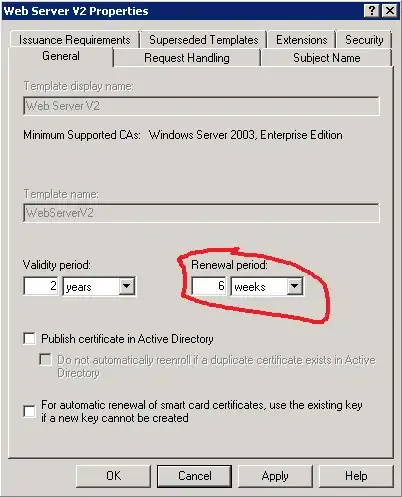
1) certificate renewal will be triggered at the timespan specified in the certificate template prior to certificate expiration. If fails, autoenrollment client will attempt to renew certificate periodically.

enter image description here

in a given example, autoenrollment will make first attempt to renew certificate 6 weeks prior to certificate expiration.

2) In order to renew certificate, client must be able to connect domain controllers and CA server(s) via RPC/DCOM.

3) make sure if clients have Read, Enroll and Autoenroll permissions on Target certificate template.

Crypt32
  • 7,461
2

DA machines, by definition, are connected to the domain. They get their GPOs and all other things exactly as if they were on-site.

As long as you have automatic renewal with a percentage period long enough that people won't get locked out (longer than a weekend or planned company downtime), you should be good. Here's a screenshot of the relevant GPO setting.

http://1.bp.blogspot.com/-IpzPPsHHQ14/UfLwHEeJE_I/AAAAAAAAASg/qUYAP3GRxtA/s1600/Auto+Enrollment.png

/Edit - Aha. The PKI I was looking at was not showing this, but I found it online. Here's the portion of the Cert Template that must also be set : Renewal Period, on the General tab. It's likely that the GPO setting above is irrelevant for the purposes of autoenrollment and renewal.

If your current certs are built from a template without the desired value for this setting, you'll need to edit or make a new template and reissue certs, but the DA certs defaults ought to be fairly sensible.

http://i.technet.microsoft.com/dynimg/IC195087.gif

mfinni
  • 36,892
0

So, you have your settings correct. But by what trigger is your client verifying that the certificate is within it's renewal period (less than 6 weeks from expiry as shown above)? This is scheduled task that runs after logon and every eight hours after that. See task scheduler, Microsoft\Windows\CertificateServicesClient\UserTask. Under Action you will see Custom Handler from which you cannot get much more detail. What is does is run dimsjob.dll as can be seen from the output of schtasks /query /XML /TN "\Microsoft\Windows\CertificateServicesClient\UserTask"

chicks
  • 3,915
  • 10
  • 29
  • 37