6

I'm installing Ubuntu onto a HP Proliant DL360 G7 server, which has a hardware Smart Array RAID controller that is not compatible with Ubuntu.

HP say the RAID controller needs to be disabled in the BIOS in order to install Ubuntu.

The problem is, with the RAID controller enabled the installation can see the hard drives to install on but then can't boot, with it disabled the installation can't see any hard drives.

UPDATE: Ubuntu installs with hardware RAID active but hangs on "Attempting to boot from hard drive C:"

I've been advised to put the server into rescue mode and reinstall GRUB but holding down shift at any time during boot doesn't bring up the GRUB menu (I've tried it many times at different points), the Ubuntu Live USB does not have a rescue mode option.

ewwhite
  • 201,205
swdee
  • 113

6 Answers6

12

This is not true. The DL360 G7 server uses an HP Smart Array P410 controller. This uses the standard CCISS or HPSA drivers that have been in the Linux kernel for ages. You won't need anything special in order to install Ubuntu on this platform.

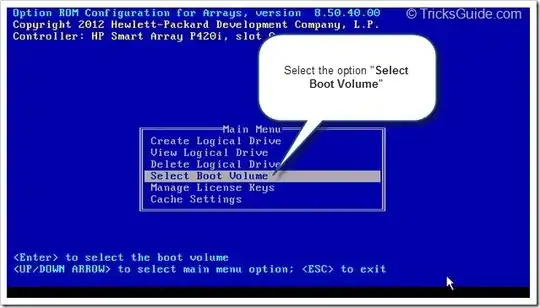
Be sure to create a Logical Drive in the BIOS RAID utility first, though. Otherwise, your Ubuntu installation won't see any disks to install to...


Edit:

It seems as though you've already installed Ubuntu. So your boot issue may be something else. Please be sure to select your boot volume in the BIOS.

grrr

Edit:

Please make sure you have the right setup in the BIOS boot order screen:

Edit:

You mentioned that you installed Ubuntu with a USB drive. That would impact the enumeration of the SCSI devices presented during the GRUB installation:

When it comes to installing the grub bootloader, make sure you specify the HD disk device (/dev/sdb) and not the USB stick (/dev/sda) otherwise it won't boot when you remove the USB stick.

ewwhite
  • 201,205
3

Check your BIOS / EFI boot settings. I would suggest switching your motherboard into BIOS boot mode and disabling EFI boot to see if you can get it to install and boot.

While the installation CD may be compatible with both EFI and BIOS, your RAID controller may not be. Ubuntu doesn't assign drive letters such as "C" and would never print anything to screen saying "Attempting to boot from hard drive C", that's either your BIOS/EFI boot or the RAID controller itself.

To my knowledge, most RAID controllers do not work in EFI mode in Linux, but will operate in Windows, explaining why HP could claim that it is incompatible/unsupported.

IceMage
  • 1,346
3

Try here: http://h30499.www3.hp.com/t5/ProLiant-Servers-ML-DL-SL/Problems-booting-up-G5-servers-after-firmware-upgrades/td-p/6210531#.VK_k9nuUJSA

Specifically:

This turned out to be a misterious Grub2 issue that was triggered by the storage array firmware upgrade. The moment we replaced Grub2 with Extlinux on affected servers, booting problems dissappeared for good. This has been verified for three servers which started having boot problems over the past three months.

Other possibilities:

http://h30499.www3.hp.com/t5/ProLiant-Servers-ML-DL-SL/ML350-G3-Attempting-to-boot-from-hard-drive-c-hanging/td-p/5112137#.VK_lEnuUJSA

http://ubuntuforums.org/showthread.php?t=1199866

TheCleaner
  • 33,047
2

If you installed Ubuntu from a USB drive, try connecting the USB drive again and reboot. If Ubuntu runs normally execute (device could change):

sudo grub-install /dev/sda

Disconnect the USB drive and restart the system.

Based on 'ewwhite' answer.

0

This all happened by trying to install Ubuntu 14.10, instead I tried 12.04 and it worked first time! Must have something conflicting in 14.10 with this server.

SOLVED!

Thanks to everyone for trying to help

swdee
  • 113
0

I tried several times to install Ubuntu 14.04 LTS and 15.04 from a bootable USB onto a DL380 G7 without CD/DVD-drive. The installation looked fine, but every attempt to boot resulted in the dreaded ""Attempting to boot from hard drive C:" followed by a hanging system.

I finally succeeded by defining the ISO as a virtual CD in the iLO and temporarily changing the boot menu to boot from CD (pressing during boot).

Hope this helps someone else.

herta
  • 1