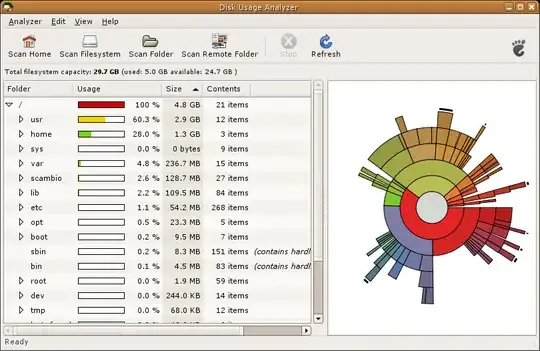
How can I get an overview of the disk usage on a Synology hard drives like this:
Asked
Active
Viewed 2.2k times

5 Answers
14
Synology has an App on it's DSM store called Storage Analyzer, which provides a very friendly user interface to view usage by folder, user, file types, duplicates, etc... It also keeps a history by analyzing periodically...


lucasmx
- 680
6
NCDU is the closest I can find. Works really well though. Simple to use as you only have to copy the file to the diskstation, then terminal in and run. Some more instructions:

info
- 61
3
Mount the Synology volume from a Linux workstation running Gnome, and run Disk Usage Analyzer on it.

Hyppy
- 15,814
2
ncdu is now available as a community package, you can install via package manager
See details on https://synocommunity.com

Dheeraj Bhaskar
- 121
2
Because the IPKG stuff does not work for me on a DS218+, because the ipgk installes a wrong version of ncurses (needed by ncdu), the most easy way for me is using "docker".
For example: https://hub.docker.com/r/bernadinm/ncdu (there are many more)
- install the container
- docker run -it -v /:/mount bernadinm/ncdu /mount
and you have full functional "ncdu" without any problems and you don´t have to install any package installers or mess with your system.

michabbb
- 131