10

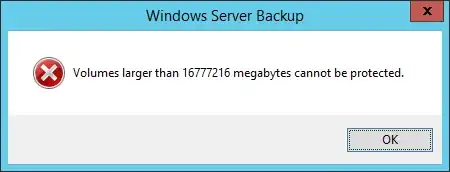
I'm trying to use Windows Server Backup to backup a RAID array on my new server. But, when I do, I run into this error:
enter image description here

The server is running Windows Server 2012 R2 and the array in question is 20TB in size (with 18TB usable); less than 1TB is currently being used.

I know that in Windows Server 2008, you couldn't backup volumes larger than 2TB due to a limitation in VHD, but that Microsoft has now switched to VHDX, which allows for 64TB volumes to be backed up. I'm also aware than in order to take advantage of this, the drive in question must be GPT.

I have confirmed that my disk is, in fact, GPT.

enter image description here

When I run Windows Server Backup, I am using the "Backup Once" option and backing up to a network drive. I am also using what I believe to be standard settings. But, when I attempt to run the backup, I am presented with the error seen above.

I'm not sure why this is capping out at 16.7TB, since Windows Server Backup can backup volumes up to 64TB. Can anyone give me some insight as to why this may be happening or what I might be doing wrong?

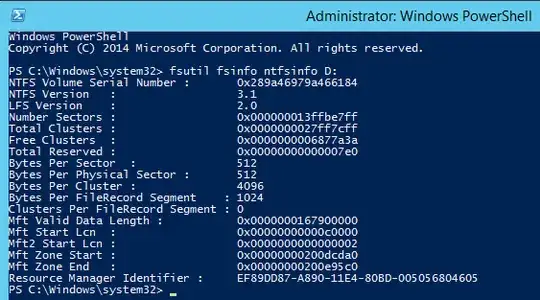
Update: I've received new drives and created the array again but I'm still getting the same error. I can confirm that my cluster count is under 2^32.

enter image description here

I read in this question that apparently Windows backup doesn't support backing up to or from disks that don't have either 512 or 512e byte sectors. Looking at the fileshare I'm attempting to backup to, it uses 4k sectors. Could this be the underlying issue? If it helps, the share that I'm trying to backup to is being hosted on a CentOS server.

2 Answers2

8

OK, the reason Windows Server Backup is failing is because of the cluster size you're using on the volume. (And I'll explain exactly why that is at the end, after the important issue of your RAID array being a time bomb.)

But before addressing the backup issue, we need to address the issue with your RAID setup.

Don't use RAID5 with large disks. And don't you use RAID5 with arrays with a lot of members. With only one parity disk, you are virtually certain to run into a (unrecoverable read error) URE or another disk failure with that many large disks, so you have no real redundancy. If you have to use parity RAID, use RAID6, but even then, parity RAID comes with serious drawbacks, so think long and hard before you settle on parity RAID.

I would recommend breaking that 20 TB array down and recreating it in RAID 10. You'll get much better performance and real redundancy for your data. Since you're only using 1 TB anyway, you still have 9 TB left for future growth, and frankly, if you hit that, you need to be looking into a dedicated NAS device or storage server.

Once you get your RAID array into a reasonable state, you will solve this problem as well, because it will be smaller than the 16 TiB it's currently complaining about. But, if you want to know, it's not the size of the array it has a problem with, it's the number of clusters. You need to have less than 2^32 clusters in the volume you're backing up. Change your cluster size from 4 KB to 8 KB and you should be good to go.

To check your cluster size, use:

fsutil fsinfo ntfsinfo F:

And you should get something like the below screenclip.

enter image description here

If you're curious where that 16TiB number comes from, this msdn blog post should clear it up for you.

HopelessN00b
  • 54,273
0

16.7 TB is the file size limit for NTFS file system. The file size limit of NTFS5 is 16 exabyte. Since this is a shared storage drive, it might well be NTFS formatted, not NTFS5 formatted. You will need to check. All of the minuses I am getting are people who assume you are writing to an NTFS5 file system.

HopelessN00b
  • 54,273
Andrew S
  • 530