10

One of our IIS servers (IIS 7.5, Server 2008 R2) is apparently "vulnerable" to the tilde Short Filename disclosure issue.

However, I'm having a hard time actually fixing the issue. So far, I've

  • Disabled 8.3 filenames, stopped the web server, recreated the site directory and started the service again

  • Added a filter rule for a tilde in the URL:
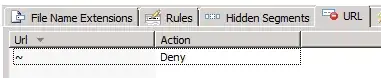
enter image description here

  • Added a filter rule for a tilde ANYWHERE:

enter image description here

  • IISRESET a couple of times

  • Checked that web.config has the relevant filter rules added

.. but still, I can't get my site to pass the test :

java -jar ~/temp/IIS-ShortName-Scanner-master/IIS_shortname_scanner.jar http://www.example.com

[...SNIP...]

Testing request method: "TRACE" with magic part: "/webresource.axd" ...
Testing request method: "DEBUG" with magic part: "" ...
Testing request method: "OPTIONS" with magic part: "" ...
Testing request method: "GET" with magic part: "" ...
Reliable request method was found = GET
Reliable magic part was found = 
144 requests have been sent to the server:

<<< The target website is vulnerable! >>>

What else do I need to do to resolve this?

EDIT: here's DIR /x which appears to show no 8.3 filenames:
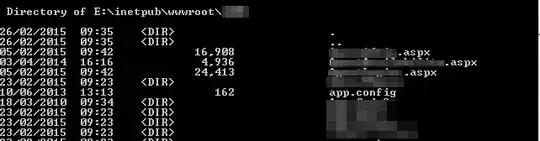
enter image description here

and here's the app pool for the site (all other sites on the server are the same):
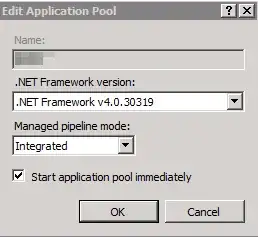
enter image description here

EDIT2: Verification there's no 8.3 filenames left:
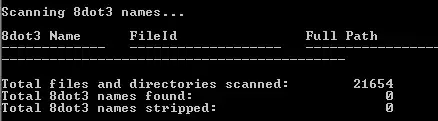
enter image description here

KenD
  • 1,167
  • 3
  • 17
  • 37

5 Answers5

7

Try to scan for existing short filenames with fsutil:

  • fsutil 8dot3name scan /s /v E:\inetpub\wwwroot

And strip them if they are found:

  • fsutil 8dot3name strip /s /v E:\inetpub\wwwroot

Also looking at the log with empty magic part (magic part: ""), I wonder could that be a bug in the POC. This line in config.xml looks like it has extra comma after /webresource.axd:

<entry> key="magicFinalPartList">
 <![CDATA[\a.aspx,\a.asp,/a.aspx,/a.asp,/a.shtml,/a.asmx‌​,/a.ashx,/a.config,/a.php,/a.jpg,/webresource.axd,,/a.xxx]]>
</entry>

I've asked dev. via Twitter about it and he responded:

For rare cases in which no extensions were required. But, recently that has caused more problems only! I'll remove it now.

I removed it from the Config file. This was the 2nd complaint so it was the right time for this change.

So, it seems that you're safe now :)

beatcracker
  • 1,359
1

also "NOTE: The change to the NtfsDisable8dot3NameCreation registry entry affects only files, folders, and profiles that are created after the change. Files that already exist are not affected. "

Note: Although disabling 8.3 file name creation increases file performance under Windows, some applications (16-bit, 32-bit, or 64-bit) may not be able to find files and directories that have long file names.

0

The best solution is below as we cannot strip after every new deployment.

Test/scan the site for vulnerability with the below link(Install java and run the command to test/scan).

Command to scan the site:

java -jar iis_shortname_scanner.jar 2 20 https://example.com/

Scan for existing short filenames:

fsutil 8dot3name scan /s /v c:\inetpub\wwwroot

Check 8dot3 name creation is disabled or enabled:

fsutil 8dot3name query C:\Release\SiteRootDocumentPath

If 8dot3 name creation is enabled, use below command to disable:

fsutil 8dot3name set C:\Release\SiteRootDocumentPath 1

8dot3name properties are set to enable 8dot3 name creation for a specified volume (0) or set to disable 8dot3 name creation on the specified volume (1)

Even if you redeploy the code in the site physical(SiteRootDocument) path it won’t create files with short names.

The scan will be passed:)

AditYa
  • 131
0

Unfortunately the only way to really deal with this is an annoying set of gyrations, depending on your version of windows, disabling the ability to generate 8.3 names.

For your version of Windows:

To disable 8.3 name creation on all NTFS partitions, type fsutil.exe behavior set disable8dot3 1 at an elevated command prompt, and then press Enter.

Source: http://support.microsoft.com/kb/121007

Dave Holland
  • 1,906
0

I'm not exactly how sure the script works and how your network it setup but how about filtering via something in front of the IIS server (even if it's just a virtual device in a virtual machine)? Namely, you setup an IPS with a rule that specifically drops traffic pertaining to that particular issue?

dtbnguyen
  • 337