2

I'm trying to connect a Server 2008 R2 NPS to a MSSQL server for logging accounting data and I'm running into issues.

I configured NPS Accounting through the "Configure Accounting" wizard and, using windows integrated security, I was able to connect to my MSSQL server (2012 express) and create a DB for accounting.

When I test it out though my NPS generates a 6274 event: "... could not be written to the configured accounting datastore".

Looking on my DB server I see a 18456 event: "Login failed for user 'mydom\npsserver$'. Reason: Failed to open the explicitly specified database 'myNPSDB'. [CLIENT: NPS.servers.IP.addr]"

So even though I setup the DB connection with a domain account with DB access the server is connecting with the local machine account.

I don't want to give my NPS server's computer account explicit access to my DB and want to use a domain account instead.

When in the Data Link Properties dialogue box I tried to enter a domain account with "Use a specific user name and password", but I get a "Login failed for user" error- I know the credentials I typed in were correct.
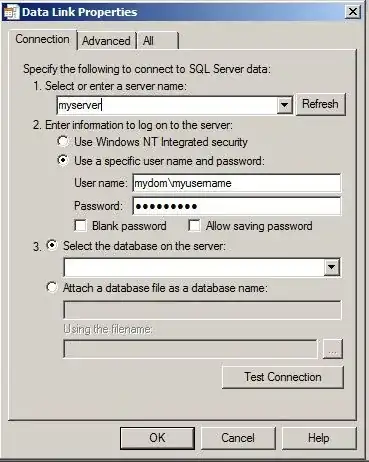
enter image description here

I then tried running the Network Policy Server service as a domain account, but after doing this it would not start.

How can I get my NPS to connect to my DB with a domain account?

red888
  • 4,351

2 Answers2

1

Make sure your SQL instance is using mixed mode authentication. By default SQL is installed using Windows authentication only.

From this MSDN page:

To change security authentication mode

In SQL Server Management Studio Object Explorer, right-click the server, and then click Properties.

  • On the Security page, under Server authentication, select the new server authentication mode, and then click OK.
  • In the SQL Server Management Studio dialog box, click OK to acknowledge the requirement to restart SQL Server.
  • In Object Explorer, right-click your server, and then click Restart. If SQL Server Agent is running, it must also be restarted.

To enable the sa login

  • In Object Explorer, expand Security, expand Logins, right-click sa, and then click Properties.
  • On the General page, you might have to create and confirm a password for the login.
  • On the Status page, in the Login section, click Enabled, and then click OK.
squillman
  • 38,163
0

I have managed to make this work by adding the computer account dbo permissions on the NPS Accounting database. As you cannot searcht he cmputer account when creating a new login using SQL Management studio, you have to manually type the account as domain\computername$ and grant the dbo permission for the NPS Accounting database. It's a bit tedious if you have multiple RADIUS servers trying to log their transactions to SQL but at least it works.

I also tried using a computer group but this is not successful.

J A
  • 1