3

I have a HP DL380G5 with ESXi 5.5 and x4 146GB Sata disks in a RAID5 array. I have added one more disk to the server exactly as the other ones and, using SmartStart CD I managed to add the disk to the array. No issues so far.

Next day, using the same CD, I added the unallocated space to the VMWare disk. Waited for another day, restarted the host (server) and when tried to increase the datastore from within vSphere client, I don't see any LUN available for expansion.

In the device view, it is showing the total VMware disk capacity with the space allocated from the new disk (546.8GB).

It's been 2 weeks since this was done and the host has been restarted several times since then but no difference.

Forgot to mention: From "Configuration"-"Storage", I have refreshed and re-scanned all disks several times but unfortunately no luck. Still no LUN available.

I still have the option of SSH it and do so from there, but I would like to rather do it from the vSphere client if possible.

mfinni
  • 36,892
gasfe78
  • 41

4 Answers4

2

I don't think you're going to find another LUN on the system after extending the array and logical disk, unless you created a new array with the single disk.

You'll likely just see the existing LUN will have some free space, with which you can extend the datastore.

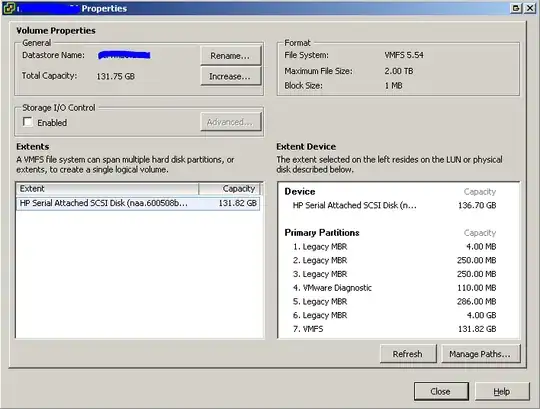
Assuming you're using the c# client, go to the Datastore in question via the Configuration tab for the host, then click on Storage in the Hardware frame. Just above the lowerr pane, click on Properties.... This will bring up a window similar to this one Datastore Properties

In this window, you should be able to click Increase... and extend the VMFS.

GregL
  • 9,870
2

Having the same issue here. I found that when you connect your client directly to the host, the LUN will be available in the select LUN screen to expand. Once this is done, the rest of the hosts see the additional space. Seems to be a workaround for now, but haven't had a chance to investigate further.

1

Try connecting directly to the ESXi host (using root user), and not vCenter server through the client. I've experienced this issue, and connecting directly to the host resolved the issue.

bgarlock
  • 139
  • 1
  • 8
0
  • You don't have to reboot to do this.
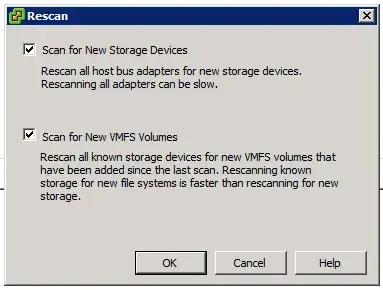
  • Go to Configuration -> Storage -> Rescan All.
  • Rescan to view new storage devices.

enter image description here

  • Now you can choose "Add Storage" and expand the volume.
ewwhite
  • 201,205