3

This is not a duplicate. This question is much more detailed than "What is group policy". Mods need to be a little less aggressive around here.

I'd like to push out a Windows Firewall: Allow remote administration exception properties group policy to all computers connected to my DC. The instructions from MS are here, the relevant line is "Right-click the selected OU, and click Group Policy Update…". If I try to update the Users GPO it says there are no computer objects. If I try to add a "Computers" object, it says it already exists. The only thing in the tree that I can update is the Domain Controllers object; that doesn't seem right.

It's very confusing. If I can't add it, how come I can't see it? I don't have any filters turned on.

The whole point of this is to be able to force a GP update on all computers in the domain. The instructions that I linked imply that I can do that via the GPMC but I don't see any way to accomplish that.
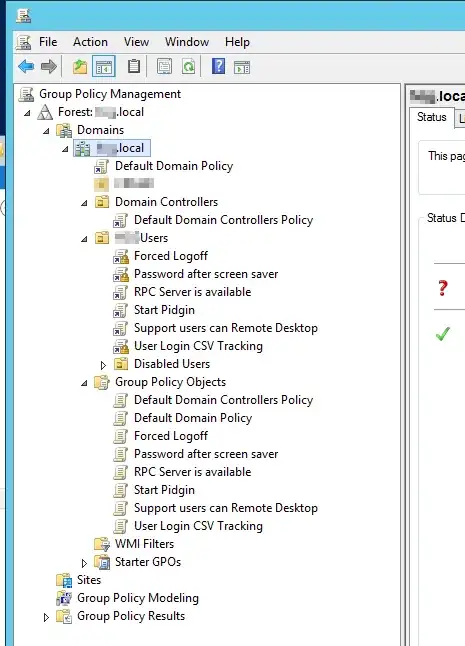
GPMC tree

jcollum
  • 446
  • 2
  • 5
  • 16

2 Answers2

6

GPOs can only be linked to Organizational Units (OUs), but the default "Computers" folder in an Active Directory domain is a container, not an OU, thus you can't link GPOs to it; but you can't create an OU called "Computers", because there already is an object with that name. You should have a look at your domain structure using the "Active Directory Users and Computers" console, which will show you all objects inside your domain, as opposed to the GPMC which only shows OUs and GPOs.

jcollum
  • 446
  • 2
  • 5
  • 16
Massimo
  • 72,827
1

My thoughts:

First of all, you clearly need to resolve why you're not seeing the Computers container. You may need to check your privileges, and then the ACLs applied to the object.

Then:

  1. Create a new GPO that includes your desired firewall settings
  2. In the filtering options, specify a single test machine, e.g.: myserver$
  3. Link the new GPO to the root of your Computers container ...OR... to the root of your domain (if you can't resolve the first issue)
  4. Perform a GPUpdate /force /boot on myserver
  5. Use Resultant Set of Policy (RSoP) to confirm that the new policy settings have reached the server
  6. Once happy, expand the filter group or change it to Authenticated Users

Edited.

Simon Catlin
  • 5,242