5

I'm new to AD and Windows Server, and this sounds like it should be pretty obvious, but I can't seem to figure out the distinction between a tree and a forest.

According to the book I'm reading: Active Directory For Dummies:

To put it simply, you create a forest only if you need to use more than one namespace. If you require more than one namespace because you require more than one naming structure, you need to plan an additional tree for each namespace.

The book also provides this diagram:
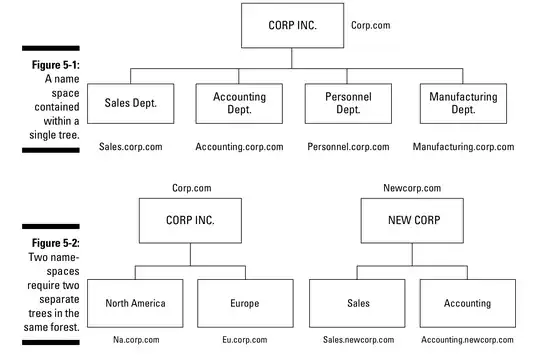
enter image description here

I don't completely understand the statement, but according to the diagram, if you have Corp.com and Newcorp.com, you should have 2 trees in the same forest as opposed to 2 different forests. According to this however:

Windows Active Directory naming best practices?

the main recommended way of naming your "AD", by which I assume they mean forest, is:

  • An unused sub-domain of a domain that you use publicly. For example, if your public web presence is example.com your internal AD might be named something like ad.example.com or internal.example.com.

Using the recommended way, if you name your active directory ad.Corp.com and later need to add ad.Newcorp.com to your forest as a new tree, it seems like it's going to be pretty weird since ad.Newcorp.com will be a tree in a forest named ad.Corp.com.

What am I missing here?

Edit:

According to https://www.youtube.com/watch?v=Whh3kPS0FdA, you would mostly only need a new forest if you:

  • Merge with another company whose AD forest has a different schema than yours
  • Are testing an application that makes changes to the schema, and you don't want it to effect your production schema

My biggest problem is this: What would you name your forest so that even if you add different DNS namespaces later (like adding NewCorp.com), you don't end up with a forest named Corp.com with a tree named NewCorp.com, or something even weirder? And if a forest can contain multiple DNS namespaces, why is it recommended to name it something like ad.example.com instead of something generic?

Edit 2:

The same book suggests using something generic like AD.LOCAL as the name of the forest root domain, which makes sense, as this would allow you to have multiple DNS namespaces. Using SOMETHING.LOCAL is no longer considered a good name for a forest root domain however, so how does the new suggested naming convention handle different DNS namespaces?

Tal
  • 315

2 Answers2

5

.local was never a good idea and was never recommended. I'd be suspect of the other material in that book.

In the vast majority of situations, your question doesn't matter because multiple domain forests are almost never necessary anymore.

You need a new forest when you need a security boundary. A forest is a security boundary. If you require isolation of resources for legal or compliance reasons, a forest will achieve this.

You need a new child domain or tree root, well....really never. It used to be for different password policies or to reduce replication overheard or for management purposes, but really in modern AD domains this can all be achieved in a single domain scenario.

MDMarra
  • 101,323
1

Your question is overly broad, but to answer one part of it, it is possible for corp.com and newcorp.com namespaces to exist in the same forest. This is a "tree root trust" and occurs when creating a new domain tree in an existing forest, as opposed to the more common "parent-child trust" scenario where a new domain is added to an existing tree and is a child domain of a top-level root. Both trust types are two-way and transitive.

Trust Types
https://technet.microsoft.com/en-us/library/cc775736%28v=ws.10%29.aspx

To answer this question:

My biggest problem is this: What would you name your forest so that even if you add different DNS namespaces later (like adding NewCorp.com), you don't end up with a forest named Corp.com with a tree named NewCorp.com, or something even weirder?

Well, don't use the TLD for the forest root domain. Instead of contoso.com, use contosoad.contoso.com or something like that for the AD forest root namespace.

As far as general reasons for having multiple forests:

  • Test environments (as you already mentioned) are ideal for a separate forest. The production forests should never trust the test forests.

  • If one part of your company is subject to specific legal or regulatory requirements. You may not want the entire company infrastructure subject to these requirements (or your business may operate in multiple geographic areas with different or conflicting requirements), so it may be more practical to have that component of the company in a separate infrastructure, including a separate Active Directory forest.

  • "Shadow" forests are somewhat popular for products such as SharePoint, Lync, Office 365. There could be multiple drivers for this. You don't want to update the schema in the main production forest. You don't want to synchronize accounts with the main production forest for security reasons.

  • Forest recovery scenario. Although large distributed AD forest topologies are rare, if you have one, a full forest recovery scenario can be a problem. This becomes particularly acute if it is distributed globally and network bandwidth is slow or unreliable and the database is large.

  • Dedicated administrative forest. In large, high-security environments, it may be advisable to create a separate forest to protect highly-privileged administrative accounts to mitigate the risk of pass-the-hash attacks. For more information, see Appendix "Dedicated administrative forests" in:

Mitigating Pass-the-Hash and Other Credential Theft v2

Greg Askew
  • 39,132