10

We are using a total of 7 Windows Server (2008/2012) R2 Standard Editions for development and production environments. Last month our servers was compromised and we found many failed attempt logs in windows event viewer. We tried cyberarms IDDS but it didn't prove to be good earlier.

Now we have re-imaged all our servers and renamed Administrator/guest accounts. And after setting up servers again we are using this idds to detect and block unwanted ip addresses.

The IDDS is working good but still we are getting 4625 events in event viewer without any source ip address. How can I block these requests from anonymous ip addresses ?

<Event xmlns='http://schemas.microsoft.com/win/2004/08/events/event'>
  <System>
    <Provider Name='Microsoft-Windows-Security-Auditing' Guid='{54849625-5478-4994-A5BA-3E3B0328C30D}'/>
    <EventID>4625</EventID>
    <Version>0</Version>
    <Level>0</Level>
    <Task>12544</Task>
    <Opcode>0</Opcode>
    <Keywords>0x8010000000000000</Keywords>
    <TimeCreated SystemTime='2015-04-18T15:18:10.818780700Z'/>
    <EventRecordID>187035</EventRecordID>
    <Correlation/>
    <Execution ProcessID='24876' ThreadID='133888'/>
    <Channel>Security</Channel>
    <Computer>s17751123</Computer>
    <Security/>
  </System>
  <EventData>
    <Data Name='SubjectUserSid'>S-1-0-0</Data>
    <Data Name='SubjectUserName'>-</Data>
    <Data Name='SubjectDomainName'>-</Data>
    <Data Name='SubjectLogonId'>0x0</Data>
    <Data Name='TargetUserSid'>S-1-0-0</Data>
    <Data Name='TargetUserName'>aaron</Data>
    <Data Name='TargetDomainName'>\aaron</Data>
    <Data Name='Status'>0xc000006d</Data>
    <Data Name='FailureReason'>%%2313</Data>
    <Data Name='SubStatus'>0xc0000064</Data>
    <Data Name='LogonType'>3</Data>
    <Data Name='LogonProcessName'>NtLmSsp </Data>
    <Data Name='AuthenticationPackageName'>NTLM</Data>
    <Data Name='WorkstationName'>SSAWSTS01</Data>
    <Data Name='TransmittedServices'>-</Data>
    <Data Name='LmPackageName'>-</Data>
    <Data Name='KeyLength'>0</Data>
    <Data Name='ProcessId'>0x0</Data>
    <Data Name='ProcessName'>-</Data>
    <Data Name='IpAddress'>-</Data>
    <Data Name='IpPort'>-</Data>
  </EventData>
</Event>

UPDATE : After checking my firewall logs I think these 4625 events are not related to Rdp in anyway, but may be SSH or any other attempts which I'm not familiar with

Greg Askew
  • 39,132
Alan
  • 101

4 Answers4

8

IP address for failed RDP attempts is logged here even with NLA enabled (no tweaks required) (tested on Server 2012 R2, not sure about other versions)

Applications and Services Logs > Microsoft-Windows-RemoteDesktopServices-RdpCoreTS/Operational (Event ID 140)

Logged text example:

A connection from the client computer with an IP address of 108.166.xxx.xxx failed because the user name or password is not correct.

XML:

- <Event xmlns="http://schemas.microsoft.com/win/2004/08/events/event">
- <System>
  <Provider Name="Microsoft-Windows-RemoteDesktopServices-RdpCoreTS" Guid="{1139C61B-B549-4251-8ED3-27250A1EDEC8}" /> 
  <EventID>140</EventID> 
  <Version>0</Version> 
  <Level>3</Level> 
  <Task>4</Task> 
  <Opcode>14</Opcode> 
  <Keywords>0x4000000000000000</Keywords> 
  <TimeCreated SystemTime="2016-11-13T11:52:25.314996400Z" /> 
  <EventRecordID>1683867</EventRecordID> 
  <Correlation ActivityID="{F4204608-FB58-4924-A3D9-B8A1B0870000}" /> 
  <Execution ProcessID="2920" ThreadID="4104" /> 
  <Channel>Microsoft-Windows-RemoteDesktopServices-RdpCoreTS/Operational</Channel> 
  <Computer>SERVER</Computer> 
  <Security UserID="S-1-5-20" /> 
  </System>
- <EventData>
  <Data Name="IPString">108.166.xxx.xxx</Data> 
  </EventData>
  </Event>
3

This is a known limitation with the 4625 event and RDP connections using TLS/SSL. You will need to use RDP encryption for the remote desktop server settings, or get a better IDS product.

Greg Askew
  • 39,132
2

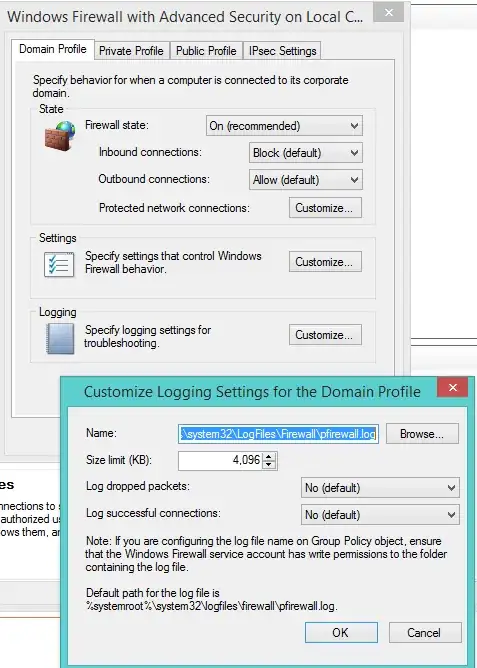
You should use the built-in Windows Firewall and its logging settings. The logs will tell you the IP addresses of all incoming connection attempts. Since you mentioned that all your servers are internet-facing, there really is no excuse for not using the Windows Firewall as a part of your defense in depth strategy. I would specifically recommend not turning off NLA (network-level authentication,) since many of the attacks on RDP in the past have historically been mitigated by the use of NLA and only affected RDP session hosts running classic RDP encryption only.

Windows Firewall Logging

Ryan Ries
  • 56,311
1

This Event is usually caused by a stale hidden credential. Try this from the system giving the error:

From a command prompt run: psexec -i -s -d cmd.exe
From the new cmd window run: rundll32 keymgr.dll,KRShowKeyMgr

Remove any items that appear in the list of Stored User Names and Passwords. Restart the computer.

zea62
  • 99