2

Windows Server 2012 R2 w/GUI

Still setting up my first host for virtualized servers. The overwhelming guidance is to NOT install anything on the host OS; meaning put the DC & etc. all in VM's.

But I'm coming across little things that I need such as UPS alert and shutdown software, and manufacturer server monitoring software (which requires Java).

I don't see any way around not installing these things on the host but thought I would ask for input in case there's something I need to consider, or maybe these apps are not considered a big deal so there's no real reason to worry. Thx.

Alan
  • 1,033

3 Answers3

2

Unless the thing you're installing is directly interacting with the physical hardware or the hypervisor itself, then it doesn't belong on the host.

Things that would qualify for local installation (not an authoritative or exhaustive list):

  1. Monitoring software/agents
  2. Hardware agents (like for UPS)
  3. Drivers

There are no doubt others but you really want to keep the hypervisor as stripped down, lightweight and small as possible.

GregL
  • 9,870
1

The link below is to a question about where to install SCCM, but the answer speaks very well to this question about installing other software on the Hyper-V host. The answer also includes some great links to reference material on the topic.

Where should SCCM be installed in a small system?

Alan
  • 1,033
0

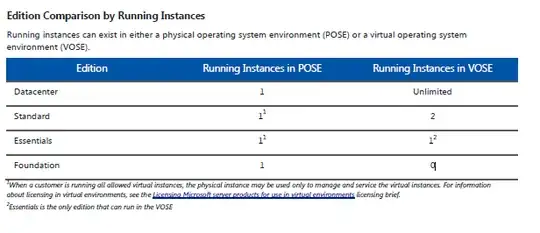
The Microsoft licensing keep it clear, it must be software for the Hyper-V role only (indirectly driver/software for the server to keep it running), but for another reason, as they give you the right for a 1 (phy):2 (virtual) with 1 standard license in exemple. (check the small line in the pic, it's told there)

enter image description here

Search WindowsServer2012R2_Licensing_Guide.pdf on google

yagmoth555
  • 17,495