42

We have a makeshift server room that contains a rack with half a dozen servers and some network equipment. The room is cooled by a dual-hose portable a/c unit that is vented into the attic. At this time the portable a/c unit can not keep up with the heat being generated and the temperature rises to around 81 degrees Fahrenheit before stabilizing. As a side note the servers are currently mounted directly on top of each other in the rack (no space).

In my opinion the only way to lower the temperature in the room without getting a larger a/c unit is to reduce the amount of heat being generated. In other words, I need to reduce the number of servers.

My buddy contends if we space the servers apart the cooling will be more efficient and result in a lower room temperature.

I think my buddy doesn't understand the law of conservation of energy. Please help us settle this dispute.

bgtvfr
  • 1,292
Brandon
  • 531

8 Answers8

36

The airflow in rack servers (and any rackable equipment, actually) is designed to move horizontally, so that they can be rack-mounted on top of each other without any need for wasting rack space. Spacing them vertically would effectively accomplish nothing, and it could even decrease cooling effectiveness, due to how airflow is designed to work inside a rack cabinet (cool air should enter from the front, hot air should exit from the rear, and air should flow through servers, not between them).

This doesn't have anything to do with conservation of energy, however; it's just an airflow design issue.

About conservation of energy: you are of course absolutely correct; if there are (say) five hot objects giving away heat to a closed room, it doesn't matter at all if they are touching or if they are spaced apart; the amount of heat flowing from them to the room would be exactly the same.

Massimo
  • 72,827
29

Your buddy has the wrong concrete suggestion: rack-mount electronics are designed to shed waste heat most efficiently to air flowing through them, not around them.

But, your buddy is correct that it may be possible to reduce the temperature of the room without removing servers or replacing the AC unit. The proper way to do this is by approximating waste heat containment as will be found in professionally designed data centers. Rearrange the room and install airflow barriers and exhaust fans, so that the cold air output from your portable AC flows directly into the front of the server rack, and the hot air coming out the rear of the the server rack is vented to the outside instead of feeding back into the AC. If the AC unit has a hot air exhaust duct, vent that to the outside as well, and try to have as little of it within the cold-air space as possible. Put cover plates over all unused rack positions so the cold air can't bypass the servers. Put the AC unit's temperature sensor in the hot-air space, then set its thermostat to a degree or two above the temperature observed in that space when the servers are all on but idle. (If this isn't possible I'd seriously consider replacing the AC with a model that does have an external temperature sensor. You're going to be stuck running it at full blast all the time otherwise.)

If done correctly, the temperature of the room overall will in fact decrease, and the exhaust temperature from the servers might decrease as well. This doesn't contradict conservation of energy. The servers will still be generating the same amount of waste heat, but it will be more efficiently removed from the room, so the room's equilibrium temperature will be cooler. Also, the air conditioner will have to do less work for the same amount of cooling, therefore it will consume less energy and produce less waste heat.

zwol
  • 1,405
6

As noted by one of the other answers, rack servers are designed to be stacked. Your friend is (basically) incorrect in so far as spacing the servers out would not achieve much; they individually vent their own heat with airflow through the unit as they are designed to do, regardless of whether or not they are stacked. As you can imagine, having airflow between the outsides of the rack mounted server units will make little difference because a) that is not how they are designed to be cooled and more importantly b) the air in the room being used to cool the servers will need to be cool to begin with for effective cooling of the equipment.

The issue here is that to be able to properly cool your servers, the environment in which they are situated (your server room) needs to also be suitably environment-controlled, such that the air being drawn into the servers for cooling will be effective at doing so.

Long story short: you need your server room to be cooler. The best way of doing this is to spec a suitable air conditioning system, but as you note, a (far) less desirable way to achieve a cooler room is to have less equipment generating heat in the room. I would still strongly urge you to invest in an appropriate air conditioning system however.

BE77Y
  • 2,697
5

Over the years I have come across many rooms like this. Until you can put in a room A/C system.. even the wall mount units work wonderful with the condenser units mounted outside the building.

Some things to consider.. As always heat rises.. Servers generate the most heat due to the shear number of fans in them.. Older servers spew out more then the newer ones.. (newer servers are also quieter due the fan control technology). However.. Anything that does not have a fan.. have them mounted lower in the rack. Move your more heat generators up to the upper parts of the rack. Hopefully its a four poster square rack. if possible anchor it to the floor. AS it can tip with weight up top.. If you have any UPS units in the rack put them on the bottom for weight. "Batteries" don't produce heat, the charger does so have it above any battery modules..

After that it helps to duct the stale old hot air out of the room with some type of in-line blower exhost fan. Couple of even bathroom fans or other similar ones help. Mount them in the ceiling above the data rack. If the rack is a closed in unit with doors, duct the hose right into the rack at the top.

Then your portable A/C unit has a half of a chance.. Also make sure your portable unit is drawing Air into it from outside the room opposite to where your exhost fan is pushing the hot air.

Another option is to have some or more "Building" Air ducted into that room. Then during the day the building system if there is one will add to the room. I have had many that did not even have a duct in the room, and the AC units were running full tilt.

Only way to make small rooms a little efficient if you can.

In time upgrade to something like a wall mount unit that has more efficient way of producing the A/C over the portable one.

Just options to help one out in the pickle...

Massimo
  • 72,827
5

Spacing the servers apart in the rack will only degrade cooling performance.

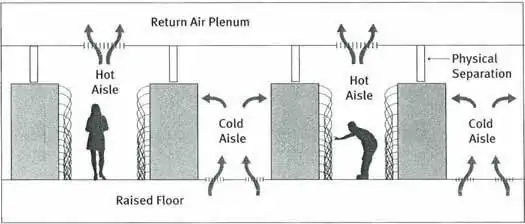
  • A typical datacenter has rows of servers facing opposite directions. This orientation is so that servers always draw cool air from one side and exhaust hot air to the other. These are called the cold aisle and hot aisle, respectively. Cold air from the air conditioner is blown into the cold aisle and warm air is extracted from the hot aisle.

Datacenter cold and hot aisles
Image source

  • For optimal cooling performance, the cold and hot aisles must be isolated. If hot air is allowed to leak to the cold aisle, cooling performance will be compromised as hot air will be recirculated through servers. Also, since it is more difficult to extract heat from cool air than from warm air, the HVAC system will need to work harder to maintain temperatures, degrading efficiency and increasing energy consumption.

  • To improve cooling and avoid overloading the air conditioner, try setting up partitions to isolate the intake and exhaust sides of the rack. Set up your HVAC so that cool air is blown into the front and warm air is exhausted out of the server room.

bwDraco
  • 1,654
2

Any electrical appliance in the room will roughly add most of its power consumption into the room as heat. If a server is drawing 750 watts of power, it will release 750 watts of heat into the room.

In order for the cooling system to work effectively, you need to reduce the amount of hot air getting trapped in the room. Have the rear of the cabinet ducted outside of the room. This should reduce the load on the AC unit, and bring your ambient temperature down significantly.

As a rough guide to sizing your AC needs, look at the max power draw of all electrical items in the room, including lights. Do not take into account the redundant PSUs as they will confuse things. Add everything up and add 20%.

Kris
  • 121
2

The core problem here is more fundamental; the servers in the room are taking in a certain amount of electricity, doing work with it, and giving you a (computational) result...as well as shedding waste heat.

Your problem lies in that, as an example, each server sheds 200btu while operating (just to pick a number). You have 6 servers, at 200btu output each max, say, plus networking gear...you need NOTABLY over 1200btu in cooling for this to be cooled. You WILL lose efficiency somewhere. Dust, venting, whatever, and you WILL have heat sources you didn't factor in, like fluorescent lights and so on.

The air conditioner cools to 81F because that's where the air conditioner's likely-direly-overloaded cooling system reaches a new equilibrium with the hotter environment.

If this cooling overload is what I suspect, adding another server MAY bump it only 5 more degrees, say, but adding a second would likely be the end of things. It would reach a runaway point, then the less-efficient electronics would shed even more heat as they ran harder...

At this point, you have a Situation like MY company did (in a server room with some 300 servers as I recall!)...the servers started dropping offline as they reached thermal maximums and tripped shutdowns, with the majority of the rest crashing. When we ran in to check the room, the 'mass failure' was in fact the room being at 120F. Tracking the CPU and ambient temperatures had never been 'a thing' for us, since "we had enough cooling"...we thought. We had recently added 25 more units, and that was more than it could survive.

Spacing might change the efficiency of heat removal in the servers themselves, but the room is hot simply because heat isn't being removed from the environment at a whole. More efficiently moving heat from A to B (computer to room), without having a way for B to shed more to C (room to outside/building) in turn, is ultimately self-defeating.

TL;DR variation: The heat generated by converting electricity into webcomics and network shares must be adequately removed by the cooling unit, which it is only barely managing to do right now. Add more air conditioning, or yes, remove a server or two.

In a pinch, turn on power management/CPU throttling on the servers. Let them idle the CPU down while it's not being maximally-used. Turn off monitors, turn off the overhead lights...also check the A/C's filter and coils, check them for dust, which would make it operate less-efficiently. Also, you may wish to track the local CPU core temps; 81F in that room may indicate 140 on the CPU, or who knows what. It's not good, though.

(edited to clarify)

Diamon
  • 21
-1

Well, but lets ask this: the temperature of WHAT do you want to lower? In fact, after the spacing, the temperature of the air in the server room might rise, but the bare metal might get cooler. In other words your friend is wrong.