5

We have an on premise Exchange 2013 server. When sending email with large attachments from ActiveSync accounts on IOS devices, the email gets stuck in the outbox and won't send. It keeps trying to resend and can cause our users to blow their data allowance and start costing hundreds in data fees. It does not do this when sending from a Gmail account linked on the phone, or from a windows 8 phone.

I've narrowed down an attachment size of about 7660870 bytes before the issue starts occurring. For a few bytes over this limit, the email will have a failure message, but will still be sent through without the attachment. If you add a few more bytes on, we get the failure message but no email goes through and it gets stuck in the outbox. These sizes are under our allowed size limits for internal and external mail. Additionally, I'm guessing the behavior of this issue depends on the total size of the message including header, body, etc., not just the attachments.

Has anyone seen this happen before, or have any idea what could be causing this?

eltommo
  • 129

3 Answers3

4

Take a look at https://technet.microsoft.com/en-gb/library/hh529949(v=exchg.150).aspx

There is an interesting line at the bottom of that page that implies the effective maximum limit is about 33% less then the limit you have configured. Given the default for active sync is 10mb and you are seeing problems around 7, that would make sense.

Try increasing to 20mb and see if that makes a difference.

Drifter104
  • 3,883
0

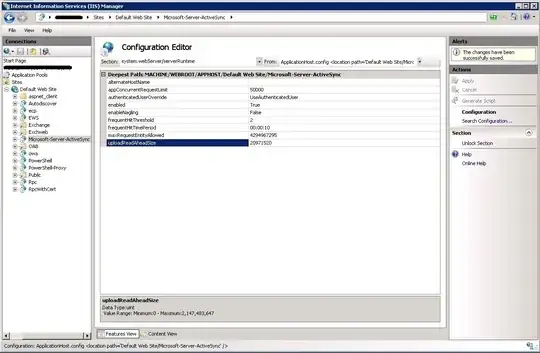
Try increasing the uploadReadAheadSize in IIS as in the following example (change the size to the one that you need):

C:\Windows\System32\inetsrv\appcmd.exe set config -section:system.webServer/serverRuntime /uploadReadAheadSize:"10485760" /commit:apphost

C:\Windows\System32\inetsrv\appcmd.exe set config "Default Web Site" -section:system.webServer/serverRuntime /uploadReadAheadSize:"10485760" /commit:apphost

Or directly from the IIS management tool:

enter image description here

-1

This doesn't seem to affect just IOS, it may be that your carrier (or carrier settings for your phone) is cutting off the message during the send, meaning that an error isn't coming from the Exchange server to the iPhone, so your iPhones are trying over and over again.

Try reducing the data cap to something like 7340032 (7 MB) or 6291456 (6 MB) and see if your phones at least stop trying to send the email. The major issue here wouldn't be that the phones can't send the email, it's that they don't stop trying and kill the battery and data plan.

IceMage
  • 1,346