I need to allow only specific Authorized USB storage device to connect to client machine other USB storage device should get blocked. How I can set Group Policy for this configuration in Windows Server 2012 Active Directory?
Asked
Active
Viewed 1.6k times

2 Answers
7
Group Policy magic.
Copy and paste from:
https://msdn.microsoft.com/en-us/library/bb530324.aspx#grouppolicydeviceinstall_topic6
Allow users to install only authorized devices
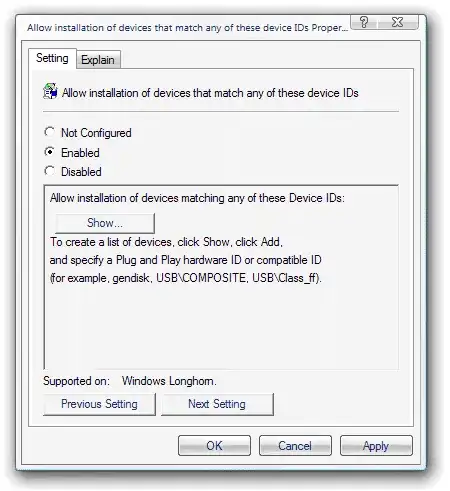
This scenario builds upon the first scenario, Prevent installation of all devices, where you prevented the installation of any device. In this scenario, you add a list of allowed devices to the policy and include the hardware ID for your USB memory drive.
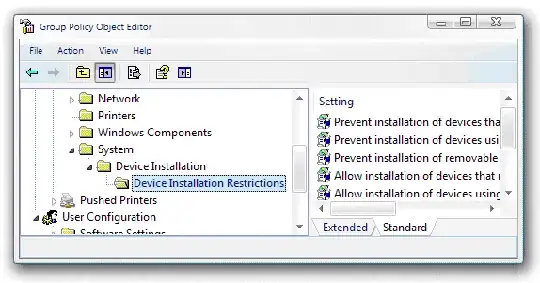
So you first prevent the installation of all USB devices using one GPO setting, then you use another GPO setting to allow only certain ones. The latter setting will take precedence, effectively creating "exceptions."

Ryan Ries
- 56,311
-1
AFAIK you can only block USB device types - not specific devices, and only during driver installation.
You might be able to find a 3rd-party utility, but I couldn't find one anywhere.
Also, there seem to be no unique ID for USB drives, so even writing something on your own would prove difficult.
In conclusion, the closest thing would be writing some event-triggered script that would look for some semaphore file that you put earlier, and if the file doesn't exist it will eject the USB drive, but that is quite easy to tamper with.

